QOwnNotesQOwnNotes
Commencer
Installation
  • Ask question
  • Ask for feature
  • Report bug
  • Telegram Channel
  • Matrix/Element.io Room
  • Gitter Chat
  • IRC Channel
  • Mastodon
  • Twitter
  • Facebook
Faire un don
  • English
  • Deutsch
  • Italiano
  • Français
  • Español
  • فارسی
  • Nederlands
  • Magyar
  • العربية
  • Polski
  • 한국어
GitHub
Commencer
Installation
  • Ask question
  • Ask for feature
  • Report bug
  • Telegram Channel
  • Matrix/Element.io Room
  • Gitter Chat
  • IRC Channel
  • Mastodon
  • Twitter
  • Facebook
Faire un don
  • English
  • Deutsch
  • Italiano
  • Français
  • Español
  • فارسی
  • Nederlands
  • Magyar
  • العربية
  • Polski
  • 한국어
GitHub
  • Commencer

    • Aperçu
    • Concept
    • Démo QOwnNotes
    • Réduction
    • Importer des notes
    • Paramètres de l'interface de ligne de commande
    • Extension de navigateur QOwnNotes Web Companion
    • Gestionnaire de snippets en ligne de commande
    • Application Web QOwnNotes
    • App QOwnNotesAPI Nextcloud
    • Note relations panel
    • Recherche de notes
    • Raccourcis
    • Contrôle de version avec git
  • Installation

    • Installation
    • Installer sur Ubuntu Linux, elementary OS et Linux Mint
    • Installer sur Microsoft Windows™
    • Installer sur macOS™
    • Installer sur Debian Linux
    • Installer sur openSUSE Linux
    • Installer sur Fedora Linux
    • Installer depuis Snap
    • Installer en tant que Flatpak
    • Installer en tant qu'AppImage
    • Install via Nix
    • Installer sur Arch Linux
    • Installer sur Solus
    • Installer sur KaOS Linux
    • Installer sur CentOS Linux
    • Installer sur Raspberry Pi OS
    • Installer sur Gentoo Linux
    • Installer sur Funtoo Linux
    • Installer sur Void Linux
    • Installer sur Slackware Linux
    • Installer sur FreeBSD
    • Compiler QOwnNotes
  • Éditeur

    • Vérification orthographique
    • AI support
    • Formats d'heure
  • Scripting

    • QOwnNotes Scriptage
    • Méthodes et objets fournis par QOwnNotes
    • Crochets
    • Classes exposées
  • Contribuer

    • Être impliqué
    • Code de Conduite
    • Mainteneurs
    • Traduction
    • Faire un don
    • Les sponsors
  • FAQ

    • Comment puis-je simplement afficher le panneau d'aperçu sans le panneau d'édition des notes?
    • Where can I find what other people said about QOwnNotes?
    • Pourquoi des statistiques d'utilisation ?
  • Blog (en anglais)

    • /fr/blog/
    • /fr/blog/2025-07-22-Universal-binary-for-macOS.html
    • /fr/blog/2025-03-14-Note-relations-panel.html
    • /fr/blog/2024-05-17-AI-support-was-added-to-QOwnNotes.html
    • /fr/blog/2023-07-12-Source-Archive-switched-from-TuxFamily-to-GitHub-Releases.html
    • /fr/blog/2023-06-17-Nextcloud-Deck-integration-in-QOwnNotes.html
    • /fr/blog/2023-06-17-QOwnNotes-UI-End2End-Tests-with-the-help-of-NixOS.html
    • /fr/blog/2023-02-03-Test-Qt6-version-of-QOwnNotes-from-a-new-PPA-for-Ubuntu-Linux.html
    • /fr/blog/2023-01-29-Evernote-import-for-huge-files.html
    • /fr/blog/2022-12-06-Happy-1000th-release-of-QOwnNotes.html
    • /fr/blog/2022-10-15-Polish-website-translation.html
    • /fr/blog/2022-07-28-Working-with-multiple-notes.html
    • /fr/blog/2021-11-23-QOwnNotes-command-line-snippet-manager.html
    • /fr/blog/2021-11-15-Nextcloud-note-versions.html
    • /fr/blog/2021-11-11-Manage-orphaned-image-files-and-attachments.html
    • /fr/blog/2021-10-25-Linking-of-note-headings.html
    • /fr/blog/2021-08-31-Tor-Hidden-Service-Webpage.html
    • /fr/blog/2021-08-25-Use-workspaces-to-manage-different-kayouts-of-the-user-interface.html
    • /fr/blog/2021-08-25-Auto-complete-in-note-editor.html
    • /fr/blog/2021-08-22-Open-links-in-the-note-editor.html
    • /fr/blog/2021-08-21-Solve-simple-equations-in-the-note-editor.html
    • /fr/blog/2021-08-21-Auto-format-markdown-tables.html
    • /fr/blog/2021-08-20-QOwnNotes-Mastodon-page.html
    • /fr/blog/2021-08-20-Repository-for-Debian-11.html
    • /fr/blog/2021-07-18-Joplin-import.html
    • /fr/blog/2021-05-02-Send-photos-from-your-mobile-phone-to-QOwnNotes-on-the-desktop.html
    • /fr/blog/2021-01-28-Four-new-languages-added-to-the-website.html
    • /fr/blog/2021-01-16-QOwnNotes-Demo.html
    • /fr/blog/2020-11-10-Markdown-explanation.html
    • /fr/blog/2020-11-10-Webpage-translation.html
    • /fr/blog/2020-11-08-QOwnNotes-for-Ubuntu-21.04-Hirsute-Hippo.html
    • /fr/blog/2020-10-27-QOwnNotes-for-Fedora-33.html
    • /fr/blog/2020-10-26-Release-and-blog-posting-automation.html
    • /fr/blog/2020-10-26-Legacy-update-service-up-again.html
    • /fr/blog/2020-10-23-RSS-Feeds-are-back-in-place.html
    • /fr/blog/2019-08-12-Time-Flies-Podcast-episode-with-interview-about-QOwnNotes.html
    • /fr/blog/2019-01-16-Bookmark-management-with-QOwnNotes-and-Web-Companion-browser-extension.html
    • /fr/blog/2019-01-09-Firefox-extension-on-Firefox-Add-ons-page.html
    • /fr/blog/2018-12-31-Chrome-extension-in-Chrome-Web-Store.html
    • /fr/blog/2018-12-27-QOwnNotes-Web-Companion-Chrome-extension.html
    • /fr/blog/2018-12-23-500th-release-of-QOwnNotes.html
    • /fr/blog/2018-10-05-QOwnNotes-Telegram-Group.html
    • /fr/blog/2018-08-07-Vim-mode.html
    • /fr/blog/2018-03-29-QOwnNotes-for-openSUSE-Leap-15-SUSE-Linux-Enterprise-15-and-SUSE-Linux-Enterprise-12-SP3.html
    • /fr/blog/2018-01-11-QOwnNotes-featured-on-LINUX-Unplugged-podcast-and-by-Ubuntu.html
    • /fr/blog/2017-12-12-Interview-for-ownCloud.html
    • /fr/blog/2017-11-24-QOwnNotes-for-Fedora-27.html
    • /fr/blog/2017-10-01-QOwnNotes-reviewed-in-German-magazine-c't.html
    • /fr/blog/2017-07-05-QOwnNotesAPI-in-the-ownCloud-Marketplace.html
    • /fr/blog/2017-07-03-QOwnNotes-as-AppImage.html
    • /fr/blog/2017-06-26-QOwnNotes-for-Debian-9.0-Fedora-26-and-openSUSE-Leap-42.3.html
    • /fr/blog/2017-05-19-Script-repository-and-script-settings-variables.html
    • /fr/blog/2016-12-20-Fedora-25-release-and-new-documentation-page.html
    • /fr/blog/2016-11-23-Solus-package-for-QOwnNotes.html
    • /fr/blog/2016-11-05-Automatic-updates-in-Windows-and-macOS.html
    • /fr/blog/2016-10-02-Note-encryption-with-keybase.io-or-directly-with-PGP.html
    • /fr/blog/2016-09-24-Evernote-import.html
    • /fr/blog/2016-09-18-Portable-mode.html
    • /fr/blog/2016-09-05-QOwnNotes-on-webupd8.org.html
    • /fr/blog/2016-07-12-QOwnNotes-featured-on-the-Linux-Voice-Podcast.html
    • /fr/blog/2016-07-12-QOwnNotes-snap.html
    • /fr/blog/2016-07-11-QOwnNotes-review-in-British-magazine-Linux-Format.html
    • /fr/blog/2016-06-27-QOwnNotes-Slackware-Linux-Repository.html
    • /fr/blog/2016-06-22-QOwnNotes-review.html
    • /fr/blog/2016-05-25-QOwnNotes-IRC.html
    • /fr/blog/2016-05-13-QOwnNotes-now-has-scripting-support.html
    • /fr/blog/2016-03-28-QOwnNotes-is-the-Desktop-App-Pick-on-the-Linux-Action-Show.html
    • /fr/blog/2016-03-25-QOwnNotes-got-featured-in-Linux-Voice-25.html
    • /fr/blog/2016-03-01-QOwnNotes-Gentoo-Linux-Overlay.html
    • /fr/blog/2016-02-26-Translate-QOwnNotes-on-Crowdin.html
    • /fr/blog/2016-02-14-QOwnNotes-1.0-out-now-in-6-languages-and-with-Freedesktop-theme-icons-support.html
    • /fr/blog/2016-01-31-QOwnNotes-software-repository-for-Debian-Linux.html
    • /fr/blog/2016-01-30-QOwnNotes-package-on-the-Arch-User-Repository.html
    • /fr/blog/2016-01-27-QOwnNotes-software-repository-for-Arch-Linux.html
    • /fr/blog/2016-01-26-Webpage-redesign.html
    • /fr/blog/2016-01-13-Qt-widget-QMarkdownTextEdit-now-a-separate-project-for-developer's-pleasure.html
    • /fr/blog/2016-01-09-New-release-version-RSS-feed.html
    • /fr/blog/2016-01-07-New-Linux-software-repositories-and-todo-list-support.html
    • /fr/blog/2015-11-04-QOwnNotes-on-Linux-Unplugged.html
    • /fr/blog/2015-07-27-Build-and-release-systems-for-QOwnNotes-for-Linux-Mac-OS-X-and-Windows.html
    • /fr/blog/2015-03-23-Links-to-other-notes-or-files-are-now-possible-in-QOwnNotes.html
  • Changelog (en anglais)

    • QOwnNotes Changelog

Extension de navigateur QOwnNotes Web Companion

Permet de capturer du contenu depuis une page affichée dans un navigateur et de gérer les favoris entre différents navigateurs et systèmes d'exploitation.

Conseil

Info

  • Info

QOwnNotes doit être en cours d'exécution pour que l'extension de navigateur Web Companion fonctionne.

  • Une connexion Internet n'est pas nécessaire. L'extension de navigateur fonctionne hors-ligne.

Installation

  1. Obtenir l'extension
    • Chrome Web Store
    • Firefox Add-ons page
    • Vous pouvez également trouver l'extension sur GitHub.
  2. Ajouter le jeton de sécurité pour configurer l'extension.
    • Une boîte de dialogue contenant un jeton de sécurité sera affichée la première fois que vous cliquerez sur l'extension de navigateur QOwnNotes. Copiez le jeton.
    • Ouvrez l'emplacement de gestion des extensions de votre navigateur. Cliquez sur les détails de l'extension QOwnNotes.
    • Copiez le jeton dans le champ "Jeton de sécurité".
  3. To use the private mode, you need to allow the extension to run in private windows in the extension settings.

Clipper Web

web-clipper

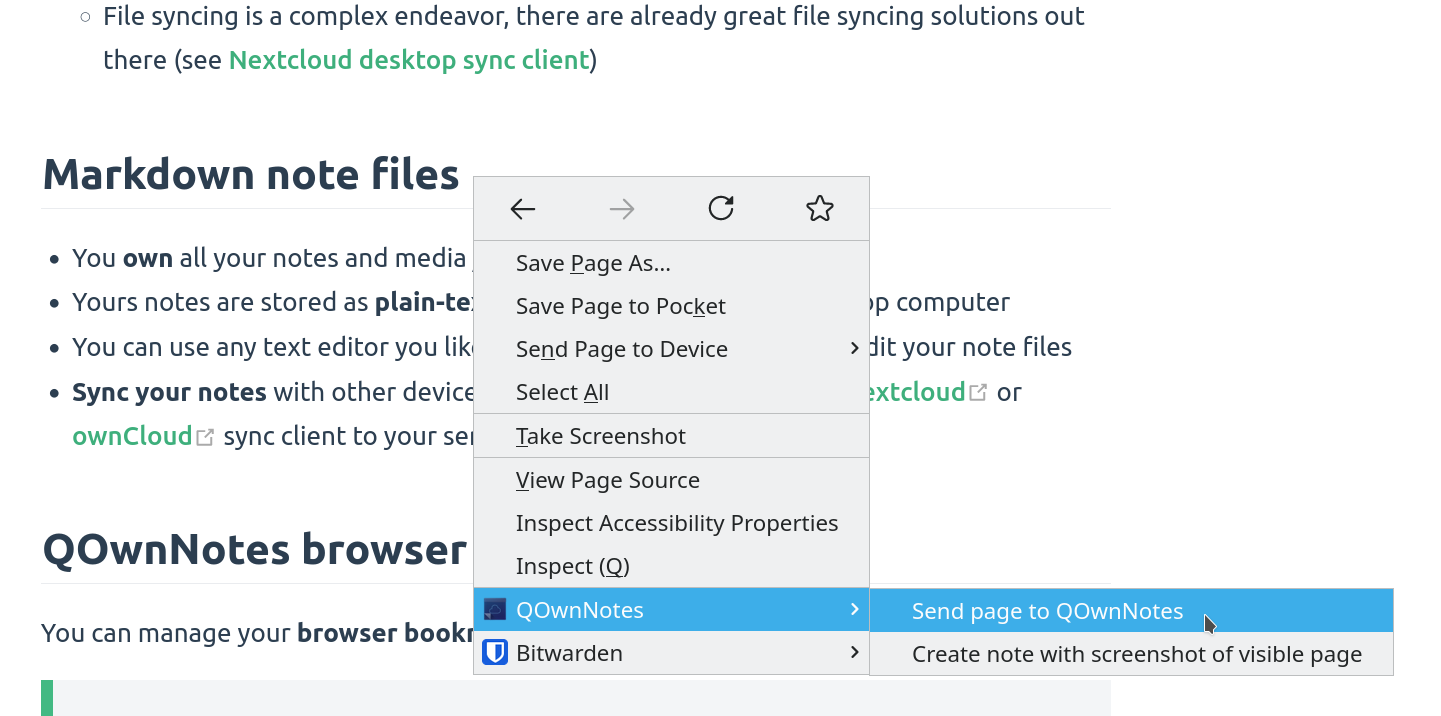
Cliquez avec le bouton droit sur une page Web ou sur du texte sélectionné pour utiliser la fonctionnalité web-clipper. Vous pouvez ici également créer une nouvelle note avec une capture d'écran de la page Web actuelle.

Avertissement

Info If the web clipper doesn't work, please check if the QOwnNotes desktop application is running, and the Web Companion browser extension is configured with the security token.

Also, make sure you accept the consent dialog when you first click the extension icon in the browser toolbar.

If you are using Firefox, you also need to make sure that you have turned on the optional permission Access your data for all websites in the Permission extension settings, otherwise you might get an error TypeError: chrome.tabs.captureVisibleTab is not a function.

Conseil

Le Web Clipper est également scriptable ! Jetez un œil à websocketRawDataHook si vous souhaitez contrôler ce que vous récupérez dans les pages Web.

Favoris

signets

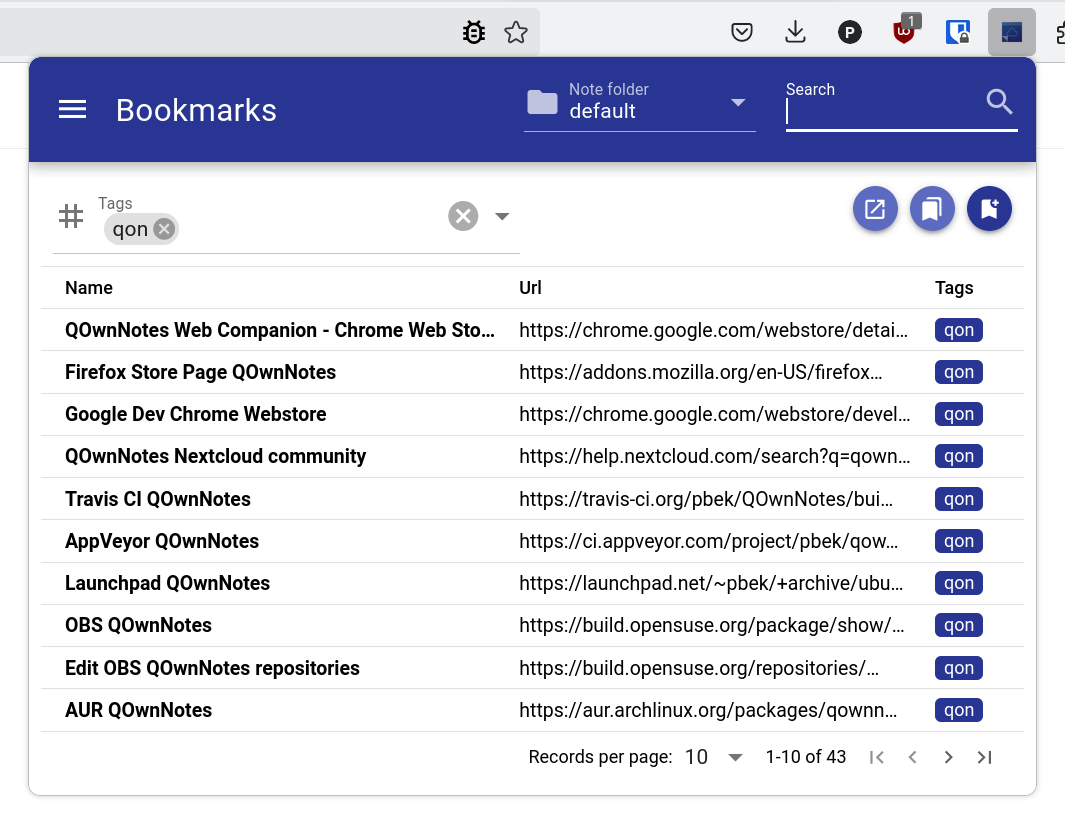
Si vous souhaitez un contrôle total sur les favoris de votre navigateur et les utiliser sur différents navigateurs et systèmes d'exploitation, l'extension de navigateur QOwnNotes est faite pour vous.

By default, the browser extension will show all links of the current note in a popup when you click the QOwnNotes icon in your browser. Ces liens seront étiquettés current.

Vous pouvez également gérer vos favoris dans des notes avec l'étiquette de note bookmarks (personnalisable dans les paramètres). Ces liens peuvent également avoir des étiquettes et une description qui seront affichées dans l'extension de navigateur.

Les nouveaux favoris sont stockés dans une note appelée Bookmarks (également personnalisable dans les paramètres).

Conseil

Vous pouvez également importer les favoris de votre navigateur dans QOwnNotes avec Web Compagnon !

Syntaxe des liens de favoris

- [Webpage name](https://www.example.com)
- [Webpage name](https://www.example.com) #tag1 #tag2
- [Webpage name](https://www.example.com) some description only
- [Webpage name](https://www.example.com) #tag1 #tag2 some description and tags

* [Webpage name](https://www.example.com) the alternative list character also works

You are able to search for name, url tags or description in the browser extension. In the current note all other links inside of text are parsed, but without tags or description.

Help us improve this page!
Prev
Paramètres de l'interface de ligne de commande
Next
Gestionnaire de snippets en ligne de commande