
QOwnNotesQOwnNotes
Rozpoczęcie
Instalacja
  • Ask question
  • Ask for feature
  • Report bug
  • Telegram Channel
  • Matrix/Element.io Room
  • Gitter Chat
  • IRC Channel
  • Mastodon
  • Twitter
  • Facebook
Wesprzyj
  • English
  • Deutsch
  • Italiano
  • Français
  • Español
  • فارسی
  • Nederlands
  • Magyar
  • العربية
  • Polski
  • 한국어
GitHub
Rozpoczęcie
Instalacja
  • Ask question
  • Ask for feature
  • Report bug
  • Telegram Channel
  • Matrix/Element.io Room
  • Gitter Chat
  • IRC Channel
  • Mastodon
  • Twitter
  • Facebook
Wesprzyj
  • English
  • Deutsch
  • Italiano
  • Français
  • Español
  • فارسی
  • Nederlands
  • Magyar
  • العربية
  • Polski
  • 한국어
GitHub
  • Rozpoczęcie

    • Przegląd
    • Pojęcie
    • Demo QOwnNotes
    • Obniżka cen
    • Importowanie notatek
    • Argumenty interfejsu wiersza poleceń
    • Rozszerzenie przeglądarki QOwnNotes Web Companion
    • Command-line Snippet Manager
    • QOwnNotes Web App
    • QOwnNotesAPI Nextcloud App
    • Note relations panel
    • Wyszukiwanie notatek
    • Skróty
    • Git versioning
  • Instalacja

    • Instalacja
    • Instalacja w systemie Ubuntu Linux, elementary OS oraz Linux Mint
    • Zainstaluj w systemie Microsoft Windows™
    • Zainstaluj na macOS™
    • Zainstaluj na Debian Linux
    • Zainstaluj na openSUSE Linux
    • Zainstaluj w Fedorze Linux
    • Install as Snap
    • Zainstaluj jako Flatpak
    • Instalacja jako AppImage
    • Install via Nix
    • Zainstaluj na Arch Linux
    • Zainstaluj na Solus
    • Zainstaluj na KaOS Linux
    • Zainstaluj na CentOS Linux
    • Zainstaluj na Raspberry Pi OS
    • Zainstaluj na Gentoo Linux
    • Install on Funtoo Linux
    • Install on Void Linux
    • Zainstaluj na Slackware Linux
    • Install on FreeBSD
    • Building QOwnNotes
  • Edytor

    • Sprawdzanie pisowni
    • AI support
    • Formaty czasu
  • Skrypty

    • QOwnNotes Scripting
    • Methods and objects QOwnNotes provides
    • Haki
    • Odsłonięte zajęcia
  • Współpraca

    • Zaangażuj się w projekt
    • Code of Conduct
    • Opiekunowie
    • Tłumaczenie
    • Wspomóż projekt
    • Sponsorzy
  • FAQ

    • Jak mogę wyświetlić sam panel podglądu bez panelu edycji notatki?
    • Gdzie mogę znaleźć opinie innych użytkowników o QOwnNotes?
    • Dlaczego metryki?
  • Blog (po angielsku)

    • /pl/blog/
    • /pl/blog/2025-07-22-Universal-binary-for-macOS.html
    • /pl/blog/2025-03-14-Note-relations-panel.html
    • /pl/blog/2024-05-17-AI-support-was-added-to-QOwnNotes.html
    • /pl/blog/2023-07-12-Source-Archive-switched-from-TuxFamily-to-GitHub-Releases.html
    • /pl/blog/2023-06-17-Nextcloud-Deck-integration-in-QOwnNotes.html
    • /pl/blog/2023-06-17-QOwnNotes-UI-End2End-Tests-with-the-help-of-NixOS.html
    • /pl/blog/2023-02-03-Test-Qt6-version-of-QOwnNotes-from-a-new-PPA-for-Ubuntu-Linux.html
    • /pl/blog/2023-01-29-Evernote-import-for-huge-files.html
    • /pl/blog/2022-12-06-Happy-1000th-release-of-QOwnNotes.html
    • /pl/blog/2022-10-15-Polish-website-translation.html
    • /pl/blog/2022-07-28-Working-with-multiple-notes.html
    • /pl/blog/2021-11-23-QOwnNotes-command-line-snippet-manager.html
    • /pl/blog/2021-11-15-Nextcloud-note-versions.html
    • /pl/blog/2021-11-11-Manage-orphaned-image-files-and-attachments.html
    • /pl/blog/2021-10-25-Linking-of-note-headings.html
    • /pl/blog/2021-08-31-Tor-Hidden-Service-Webpage.html
    • /pl/blog/2021-08-25-Use-workspaces-to-manage-different-kayouts-of-the-user-interface.html
    • /pl/blog/2021-08-25-Auto-complete-in-note-editor.html
    • /pl/blog/2021-08-22-Open-links-in-the-note-editor.html
    • /pl/blog/2021-08-21-Solve-simple-equations-in-the-note-editor.html
    • /pl/blog/2021-08-21-Auto-format-markdown-tables.html
    • /pl/blog/2021-08-20-QOwnNotes-Mastodon-page.html
    • /pl/blog/2021-08-20-Repository-for-Debian-11.html
    • /pl/blog/2021-07-18-Joplin-import.html
    • /pl/blog/2021-05-02-Send-photos-from-your-mobile-phone-to-QOwnNotes-on-the-desktop.html
    • /pl/blog/2021-01-28-Four-new-languages-added-to-the-website.html
    • /pl/blog/2021-01-16-QOwnNotes-Demo.html
    • /pl/blog/2020-11-10-Markdown-explanation.html
    • /pl/blog/2020-11-10-Webpage-translation.html
    • /pl/blog/2020-11-08-QOwnNotes-for-Ubuntu-21.04-Hirsute-Hippo.html
    • /pl/blog/2020-10-27-QOwnNotes-for-Fedora-33.html
    • /pl/blog/2020-10-26-Release-and-blog-posting-automation.html
    • /pl/blog/2020-10-26-Legacy-update-service-up-again.html
    • /pl/blog/2020-10-23-RSS-Feeds-are-back-in-place.html
    • /pl/blog/2019-08-12-Time-Flies-Podcast-episode-with-interview-about-QOwnNotes.html
    • /pl/blog/2019-01-16-Bookmark-management-with-QOwnNotes-and-Web-Companion-browser-extension.html
    • /pl/blog/2019-01-09-Firefox-extension-on-Firefox-Add-ons-page.html
    • /pl/blog/2018-12-31-Chrome-extension-in-Chrome-Web-Store.html
    • /pl/blog/2018-12-27-QOwnNotes-Web-Companion-Chrome-extension.html
    • /pl/blog/2018-12-23-500th-release-of-QOwnNotes.html
    • /pl/blog/2018-10-05-QOwnNotes-Telegram-Group.html
    • /pl/blog/2018-08-07-Vim-mode.html
    • /pl/blog/2018-03-29-QOwnNotes-for-openSUSE-Leap-15-SUSE-Linux-Enterprise-15-and-SUSE-Linux-Enterprise-12-SP3.html
    • /pl/blog/2018-01-11-QOwnNotes-featured-on-LINUX-Unplugged-podcast-and-by-Ubuntu.html
    • /pl/blog/2017-12-12-Interview-for-ownCloud.html
    • /pl/blog/2017-11-24-QOwnNotes-for-Fedora-27.html
    • /pl/blog/2017-10-01-QOwnNotes-reviewed-in-German-magazine-c't.html
    • /pl/blog/2017-07-05-QOwnNotesAPI-in-the-ownCloud-Marketplace.html
    • /pl/blog/2017-07-03-QOwnNotes-as-AppImage.html
    • /pl/blog/2017-06-26-QOwnNotes-for-Debian-9.0-Fedora-26-and-openSUSE-Leap-42.3.html
    • /pl/blog/2017-05-19-Script-repository-and-script-settings-variables.html
    • /pl/blog/2016-12-20-Fedora-25-release-and-new-documentation-page.html
    • /pl/blog/2016-11-23-Solus-package-for-QOwnNotes.html
    • /pl/blog/2016-11-05-Automatic-updates-in-Windows-and-macOS.html
    • /pl/blog/2016-10-02-Note-encryption-with-keybase.io-or-directly-with-PGP.html
    • /pl/blog/2016-09-24-Evernote-import.html
    • /pl/blog/2016-09-18-Portable-mode.html
    • /pl/blog/2016-09-05-QOwnNotes-on-webupd8.org.html
    • /pl/blog/2016-07-12-QOwnNotes-featured-on-the-Linux-Voice-Podcast.html
    • /pl/blog/2016-07-12-QOwnNotes-snap.html
    • /pl/blog/2016-07-11-QOwnNotes-review-in-British-magazine-Linux-Format.html
    • /pl/blog/2016-06-27-QOwnNotes-Slackware-Linux-Repository.html
    • /pl/blog/2016-06-22-QOwnNotes-review.html
    • /pl/blog/2016-05-25-QOwnNotes-IRC.html
    • /pl/blog/2016-05-13-QOwnNotes-now-has-scripting-support.html
    • /pl/blog/2016-03-28-QOwnNotes-is-the-Desktop-App-Pick-on-the-Linux-Action-Show.html
    • /pl/blog/2016-03-25-QOwnNotes-got-featured-in-Linux-Voice-25.html
    • /pl/blog/2016-03-01-QOwnNotes-Gentoo-Linux-Overlay.html
    • /pl/blog/2016-02-26-Translate-QOwnNotes-on-Crowdin.html
    • /pl/blog/2016-02-14-QOwnNotes-1.0-out-now-in-6-languages-and-with-Freedesktop-theme-icons-support.html
    • /pl/blog/2016-01-31-QOwnNotes-software-repository-for-Debian-Linux.html
    • /pl/blog/2016-01-30-QOwnNotes-package-on-the-Arch-User-Repository.html
    • /pl/blog/2016-01-27-QOwnNotes-software-repository-for-Arch-Linux.html
    • /pl/blog/2016-01-26-Webpage-redesign.html
    • /pl/blog/2016-01-13-Qt-widget-QMarkdownTextEdit-now-a-separate-project-for-developer's-pleasure.html
    • /pl/blog/2016-01-09-New-release-version-RSS-feed.html
    • /pl/blog/2016-01-07-New-Linux-software-repositories-and-todo-list-support.html
    • /pl/blog/2015-11-04-QOwnNotes-on-Linux-Unplugged.html
    • /pl/blog/2015-07-27-Build-and-release-systems-for-QOwnNotes-for-Linux-Mac-OS-X-and-Windows.html
    • /pl/blog/2015-03-23-Links-to-other-notes-or-files-are-now-possible-in-QOwnNotes.html
  • Dziennik zmian (po angielsku)

    • QOwnNotes Changelog

Rozszerzenie przeglądarki QOwnNotes Web Companion

Umożliwia wycinanie ze strony przeglądarki i zarządzanie zakładkami przeglądarki w różnych przeglądarkach i systemach operacyjnych.

Porady

Info

  • Aby rozszerzenie przeglądarki Web Companion działało, aplikacja QOwnNotes musi być uruchomiona.
  • Nie wymaga połączenia z Internetem. Rozszerzenia przeglądarki działają w trybie offline.

Instalacja

  1. Pobierz rozszerzenie
    • Chrome Web Store
    • Firefox Add-ons page
    • Rozszerzenie znajdziesz również w GitHub.
  2. Dodaj token zabezpieczający, aby skonfigurować rozszerzenie.
    • Po pierwszym kliknięciu ikony rozszerzenia przeglądarki QOwnNotes pojawi się okno dialogowe z tokenem bezpieczeństwa. Skopiuj token.
    • Przejdź do lokalizacji zarządzania rozszerzeniami przeglądarki. Kliknij w szczegóły rozszerzenia QOwnNotes.
    • Wklej token w polu Token bezpieczeństwa.
  3. To use the private mode, you need to allow the extension to run in private windows in the extension settings.

Schowek sieciowy
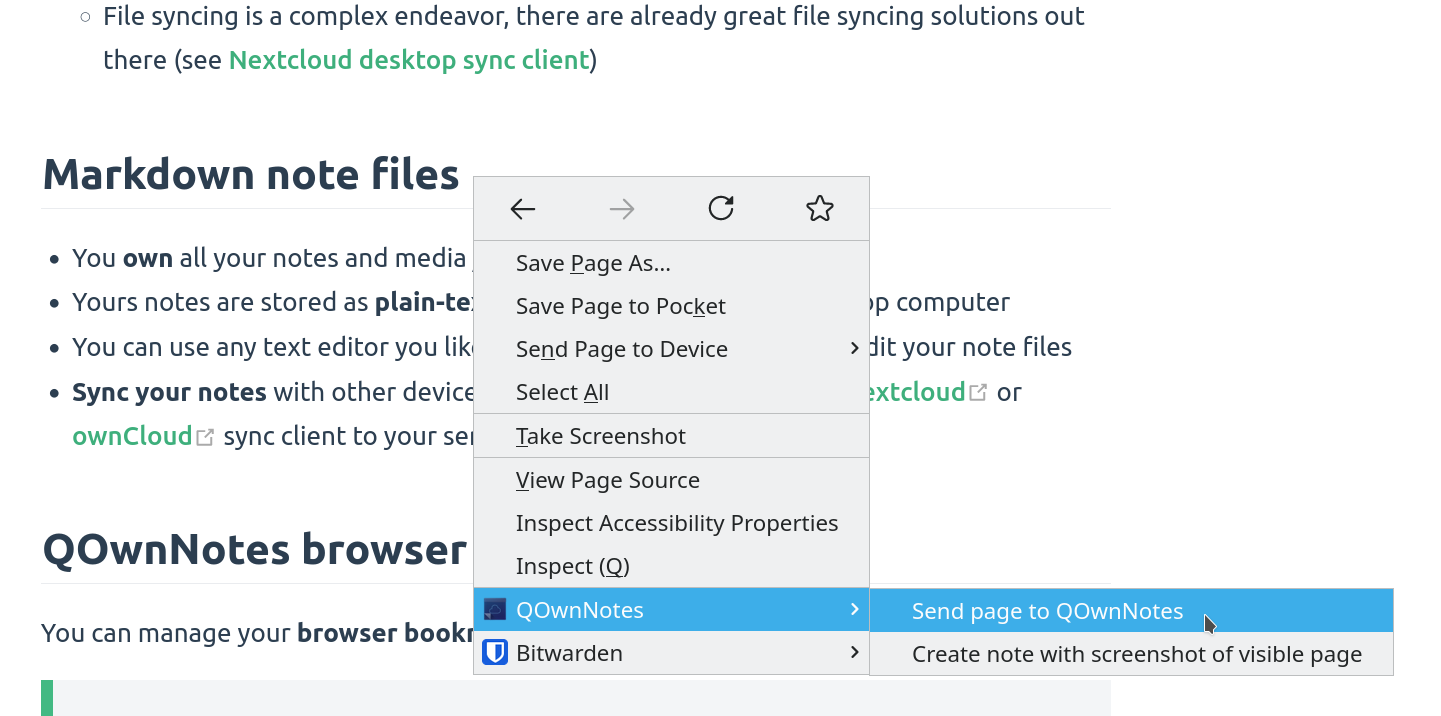
schowek sieciowy

Aby użyć funkcji wycinania fragmentów stron (web-clipper), kliknij prawym przyciskiem myszy stronę sieci Web lub zaznaczony tekst. W tym miejscu możesz też utworzyć nową notatkę ze zrzutem ekranu bieżącej strony sieci Web.

Ostrzeżenie

Info If the web clipper doesn't work, please check if the QOwnNotes desktop application is running, and the Web Companion browser extension is configured with the security token.

Also, make sure you accept the consent dialog when you first click the extension icon in the browser toolbar.

If you are using Firefox, you also need to make sure that you have turned on the optional permission Access your data for all websites in the Permission extension settings, otherwise you might get an error TypeError: chrome.tabs.captureVisibleTab is not a function.

Porady

Nożyczki sieciowe są również skryptowalne! Spójrz na websocketRawDataHook, jeśli chcesz kontrolować, co wycinasz ze stron internetowych.

Zakładki
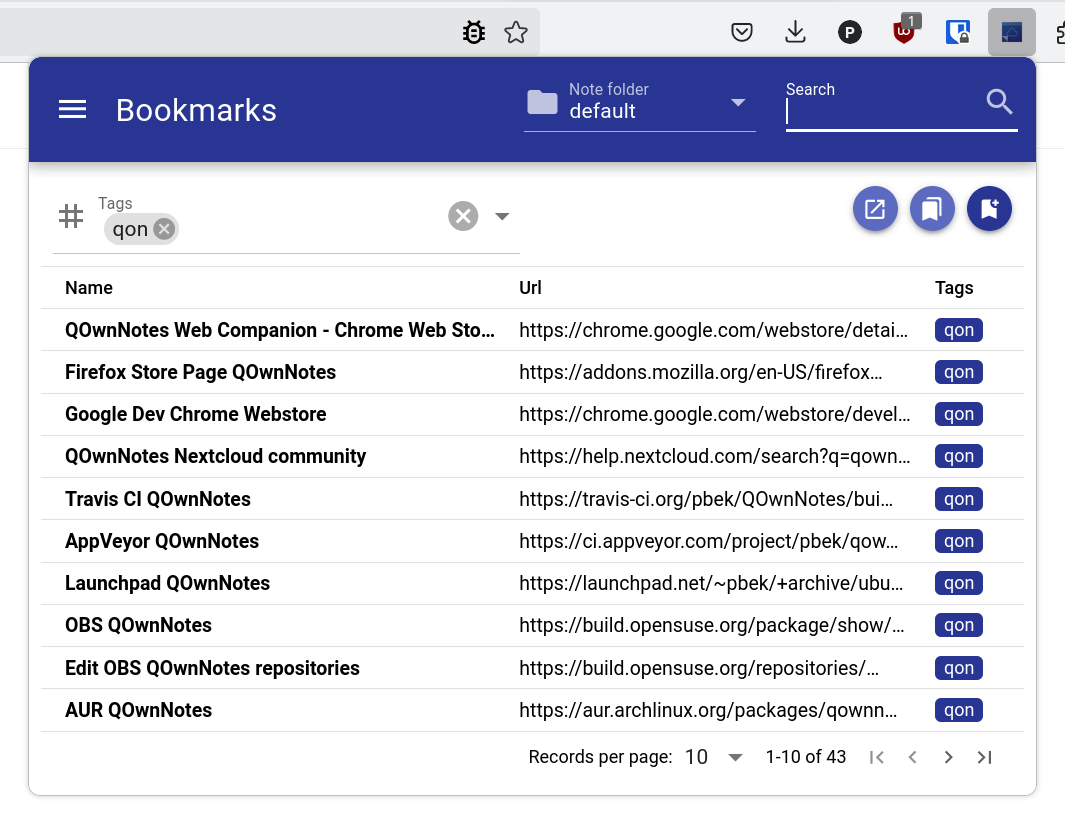
zakładki

Jeśli chcesz mieć pełną kontrolę nad zakładkami przeglądarki i używać ich w różnych przeglądarkach i systemach operacyjnych, rozszerzenie przeglądarki QOwnNotes jest dla Ciebie.

By default, the browser extension will show all links of the current note in a popup when you click the QOwnNotes icon in your browser. Te linki zostaną otagowane jako current (bieżące).

Możesz też zarządzać zakładkami w notatkach za pomocą tagu notatki bookmarks (zakładki – można go zmienić w ustawieniach). Linki te również mogą być opatrzone tagami i opisem, które zostaną wyświetlone w rozszerzeniu przeglądarki.

Nowe zakładki są przechowywane w notatce o nazwie Zakładki (można ją również zmienić w ustawieniach).

::: Wskazówka Możesz też zaimportować zakładki ze swojej przeglądarki do QOwnNotes za pomocą rozszerzenia Web Companion. :::

Składnia linków zakładek

- [Webpage name](https://www.example.com)
- [Webpage name](https://www.example.com) #tag1 #tag2
- [Webpage name](https://www.example.com) some description only
- [Webpage name](https://www.example.com) #tag1 #tag2 some description and tags

* [Webpage name](https://www.example.com) the alternative list character also works

You are able to search for name, url tags or description in the browser extension. In the current note all other links inside of text are parsed, but without tags or description.

Help us improve this page!
Prev
Argumenty interfejsu wiersza poleceń
Next
Command-line Snippet Manager