
QOwnNotesQOwnNotes
Iniziare
Installazione
  • Ask question
  • Ask for feature
  • Report bug
  • Telegram Channel
  • Matrix/Element.io Room
  • Gitter Chat
  • IRC Channel
  • Mastodon
  • Twitter
  • Facebook
Donare
  • English
  • Deutsch
  • Italiano
  • Français
  • Español
  • فارسی
  • Nederlands
  • Magyar
  • العربية
  • Polski
  • 한국어
GitHub
Iniziare
Installazione
  • Ask question
  • Ask for feature
  • Report bug
  • Telegram Channel
  • Matrix/Element.io Room
  • Gitter Chat
  • IRC Channel
  • Mastodon
  • Twitter
  • Facebook
Donare
  • English
  • Deutsch
  • Italiano
  • Français
  • Español
  • فارسی
  • Nederlands
  • Magyar
  • العربية
  • Polski
  • 한국어
GitHub
  • Iniziare

    • Panoramica
    • Idea
    • Demo QOwnNotes
    • Markdown
    • Importare le note
    • Parametri dell'interfaccia della riga di comando
    • Estensione del browser QOwnNotes Web Companion
    • Gestore dei frammenti di comandi
    • QOwnNotes Web App
    • QOwnNotesAPI Nextcloud App
    • Note relations panel
    • Alla ricerca di note
    • Tasti di scelta rapida
    • Controllo versioni con Git
  • Installazione

    • Installazione
    • Installa su Ubuntu Linux, Elementary OS e Linux Mint
    • Installa su Microsoft Windows™
    • Installa su macOS™
    • Installa su Debian Linux
    • Installa su openSUSE Linux
    • Installa su Fedora Linux
    • Installa come Snap
    • Installa come Flatpak
    • Installa come AppImage
    • Installa usando Nix
    • Installa su Arch Linux
    • Installa su Solus
    • Installa su KaOS Linux
    • Installa su CentOS Linux
    • Installa su Raspberry Pi OS
    • Installa su Gentoo Linux
    • Installa su Funtoo Linux
    • Installa su Void Linux
    • Installa su Slackware Linux
    • Installa su FreeBSD
    • Creazione di QOwnNotes
  • Editor

    • Controllo ortografico
    • AI support
    • Formati dell'ora
  • Scripting

    • Scripting di QOwnNotes
    • Metodi e oggetti forniti da QOwnNotes
    • Connessioni
    • Classi esposte
  • Contribuire

    • Partecipa
    • Codice di Condotta
    • Manutentori
    • Traduzione
    • Fai una donazione
    • Sponsor
  • FAQ

    • Come faccio a mostrare il pannello di anteprima senza il pannello di modifica delle note?
    • Dove posso trovare ciò che altre persone hanno detto su QOwnNotes?
    • Perché le metriche?
  • Blog (in inglese)

    • /it/blog/
    • /it/blog/2025-07-22-Universal-binary-for-macOS.html
    • /it/blog/2025-03-14-Note-relations-panel.html
    • /it/blog/2024-05-17-AI-support-was-added-to-QOwnNotes.html
    • /it/blog/2023-07-12-Source-Archive-switched-from-TuxFamily-to-GitHub-Releases.html
    • /it/blog/2023-06-17-Nextcloud-Deck-integration-in-QOwnNotes.html
    • /it/blog/2023-06-17-QOwnNotes-UI-End2End-Tests-with-the-help-of-NixOS.html
    • /it/blog/2023-02-03-Test-Qt6-version-of-QOwnNotes-from-a-new-PPA-for-Ubuntu-Linux.html
    • /it/blog/2023-01-29-Evernote-import-for-huge-files.html
    • /it/blog/2022-12-06-Happy-1000th-release-of-QOwnNotes.html
    • /it/blog/2022-10-15-Polish-website-translation.html
    • /it/blog/2022-07-28-Working-with-multiple-notes.html
    • /it/blog/2021-11-23-QOwnNotes-command-line-snippet-manager.html
    • /it/blog/2021-11-15-Nextcloud-note-versions.html
    • /it/blog/2021-11-11-Manage-orphaned-image-files-and-attachments.html
    • /it/blog/2021-10-25-Linking-of-note-headings.html
    • /it/blog/2021-08-31-Tor-Hidden-Service-Webpage.html
    • /it/blog/2021-08-25-Use-workspaces-to-manage-different-kayouts-of-the-user-interface.html
    • /it/blog/2021-08-25-Auto-complete-in-note-editor.html
    • /it/blog/2021-08-22-Open-links-in-the-note-editor.html
    • /it/blog/2021-08-21-Solve-simple-equations-in-the-note-editor.html
    • /it/blog/2021-08-21-Auto-format-markdown-tables.html
    • /it/blog/2021-08-20-QOwnNotes-Mastodon-page.html
    • /it/blog/2021-08-20-Repository-for-Debian-11.html
    • /it/blog/2021-07-18-Joplin-import.html
    • /it/blog/2021-05-02-Send-photos-from-your-mobile-phone-to-QOwnNotes-on-the-desktop.html
    • /it/blog/2021-01-28-Four-new-languages-added-to-the-website.html
    • /it/blog/2021-01-16-QOwnNotes-Demo.html
    • /it/blog/2020-11-10-Markdown-explanation.html
    • /it/blog/2020-11-10-Webpage-translation.html
    • /it/blog/2020-11-08-QOwnNotes-for-Ubuntu-21.04-Hirsute-Hippo.html
    • /it/blog/2020-10-27-QOwnNotes-for-Fedora-33.html
    • /it/blog/2020-10-26-Release-and-blog-posting-automation.html
    • /it/blog/2020-10-26-Legacy-update-service-up-again.html
    • /it/blog/2020-10-23-RSS-Feeds-are-back-in-place.html
    • /it/blog/2019-08-12-Time-Flies-Podcast-episode-with-interview-about-QOwnNotes.html
    • /it/blog/2019-01-16-Bookmark-management-with-QOwnNotes-and-Web-Companion-browser-extension.html
    • /it/blog/2019-01-09-Firefox-extension-on-Firefox-Add-ons-page.html
    • /it/blog/2018-12-31-Chrome-extension-in-Chrome-Web-Store.html
    • /it/blog/2018-12-27-QOwnNotes-Web-Companion-Chrome-extension.html
    • /it/blog/2018-12-23-500th-release-of-QOwnNotes.html
    • /it/blog/2018-10-05-QOwnNotes-Telegram-Group.html
    • /it/blog/2018-08-07-Vim-mode.html
    • /it/blog/2018-03-29-QOwnNotes-for-openSUSE-Leap-15-SUSE-Linux-Enterprise-15-and-SUSE-Linux-Enterprise-12-SP3.html
    • /it/blog/2018-01-11-QOwnNotes-featured-on-LINUX-Unplugged-podcast-and-by-Ubuntu.html
    • /it/blog/2017-12-12-Interview-for-ownCloud.html
    • /it/blog/2017-11-24-QOwnNotes-for-Fedora-27.html
    • /it/blog/2017-10-01-QOwnNotes-reviewed-in-German-magazine-c't.html
    • /it/blog/2017-07-05-QOwnNotesAPI-in-the-ownCloud-Marketplace.html
    • /it/blog/2017-07-03-QOwnNotes-as-AppImage.html
    • /it/blog/2017-06-26-QOwnNotes-for-Debian-9.0-Fedora-26-and-openSUSE-Leap-42.3.html
    • /it/blog/2017-05-19-Script-repository-and-script-settings-variables.html
    • /it/blog/2016-12-20-Fedora-25-release-and-new-documentation-page.html
    • /it/blog/2016-11-23-Solus-package-for-QOwnNotes.html
    • /it/blog/2016-11-05-Automatic-updates-in-Windows-and-macOS.html
    • /it/blog/2016-10-02-Note-encryption-with-keybase.io-or-directly-with-PGP.html
    • /it/blog/2016-09-24-Evernote-import.html
    • /it/blog/2016-09-18-Portable-mode.html
    • /it/blog/2016-09-05-QOwnNotes-on-webupd8.org.html
    • /it/blog/2016-07-12-QOwnNotes-featured-on-the-Linux-Voice-Podcast.html
    • /it/blog/2016-07-12-QOwnNotes-snap.html
    • /it/blog/2016-07-11-QOwnNotes-review-in-British-magazine-Linux-Format.html
    • /it/blog/2016-06-27-QOwnNotes-Slackware-Linux-Repository.html
    • /it/blog/2016-06-22-QOwnNotes-review.html
    • /it/blog/2016-05-25-QOwnNotes-IRC.html
    • /it/blog/2016-05-13-QOwnNotes-now-has-scripting-support.html
    • /it/blog/2016-03-28-QOwnNotes-is-the-Desktop-App-Pick-on-the-Linux-Action-Show.html
    • /it/blog/2016-03-25-QOwnNotes-got-featured-in-Linux-Voice-25.html
    • /it/blog/2016-03-01-QOwnNotes-Gentoo-Linux-Overlay.html
    • /it/blog/2016-02-26-Translate-QOwnNotes-on-Crowdin.html
    • /it/blog/2016-02-14-QOwnNotes-1.0-out-now-in-6-languages-and-with-Freedesktop-theme-icons-support.html
    • /it/blog/2016-01-31-QOwnNotes-software-repository-for-Debian-Linux.html
    • /it/blog/2016-01-30-QOwnNotes-package-on-the-Arch-User-Repository.html
    • /it/blog/2016-01-27-QOwnNotes-software-repository-for-Arch-Linux.html
    • /it/blog/2016-01-26-Webpage-redesign.html
    • /it/blog/2016-01-13-Qt-widget-QMarkdownTextEdit-now-a-separate-project-for-developer's-pleasure.html
    • /it/blog/2016-01-09-New-release-version-RSS-feed.html
    • /it/blog/2016-01-07-New-Linux-software-repositories-and-todo-list-support.html
    • /it/blog/2015-11-04-QOwnNotes-on-Linux-Unplugged.html
    • /it/blog/2015-07-27-Build-and-release-systems-for-QOwnNotes-for-Linux-Mac-OS-X-and-Windows.html
    • /it/blog/2015-03-23-Links-to-other-notes-or-files-are-now-possible-in-QOwnNotes.html
  • Changelog (in inglese)

    • QOwnNotes Changelog

Estensione del browser QOwnNotes Web Companion

Consente di ritagliare da una pagina del browser e gestire i segnalibri del browser su diversi browser e sistemi operativi.

Tips

Info

  • QOwnNotes deve essere in esecuzione affinché l'estensione del browser Web Companion funzioni.
  • Non è necessaria una connessione Internet. L'estensione del browser lavora offline.

Installazione

  1. Scarica l'estensione
    • Chrome Web Store
    • Pagina delle Estensioni Firefox
    • Puoi trovare l'estensione anche su GitHub.
  2. Aggiungi il token di sicurezza per configurare l'estensione.
    • La prima volta che clicchi sull'icona dell'estensione del browser di QOwnNotes, vedrai una finestra di dialogo col token di sicurezza. Copialo.
    • Vai alla gestione delle tue estensioni del browser. Clicca sui dettagli dell'estensione QOwnNotes.
    • Incolla il token nel campo del token di sicurezza.
  3. Per usare la modalità in incognito devi prima consentire all'estensione di funzionare nelle finestre in incognito dalle impostazioni.

Strumento di ritaglio web
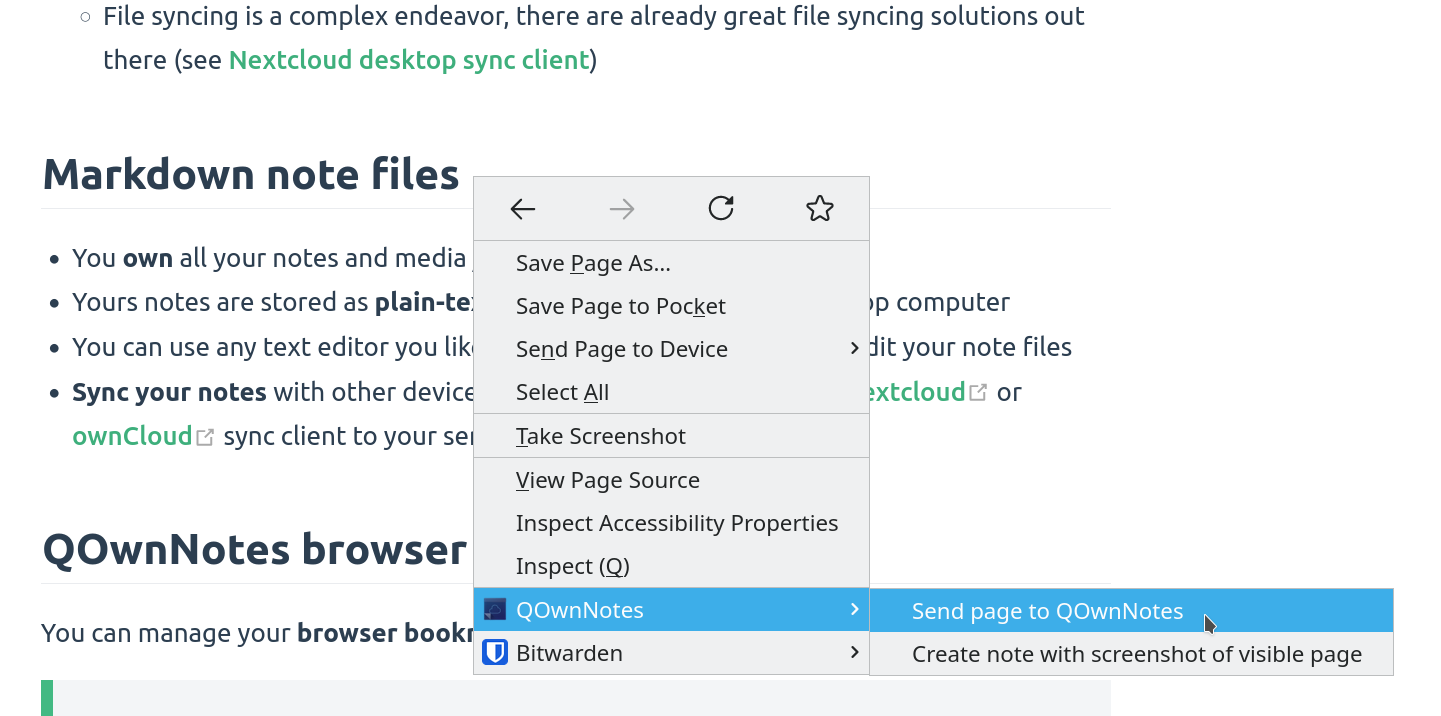
strumento di ritaglio web

Fai clic con il pulsante destro del mouse su una pagina web o sul testo selezionato per usare la funzionalità web-clipper. Lì puoi anche creare una nuova nota con uno screenshot della pagina web corrente.

Warning

Info Se il web clipper non funziona, si prega di controlare che l'applicazione desktop di QOwnNotes sia aperta e che l'estensione web di supporto sia configurata con il token di sicurezza.

Also, make sure you accept the consent dialog when you first click the extension icon in the browser toolbar.

If you are using Firefox, you also need to make sure that you have turned on the optional permission Access your data for all websites in the Permission extension settings, otherwise you might get an error TypeError: chrome.tabs.captureVisibleTab is not a function.

Tips

Il web clipper è anche scriptabile! Dai un'occhiata a websocketRawDataHook se desideri controllare ciò che ritagli dalle pagine web.

Segnalibri
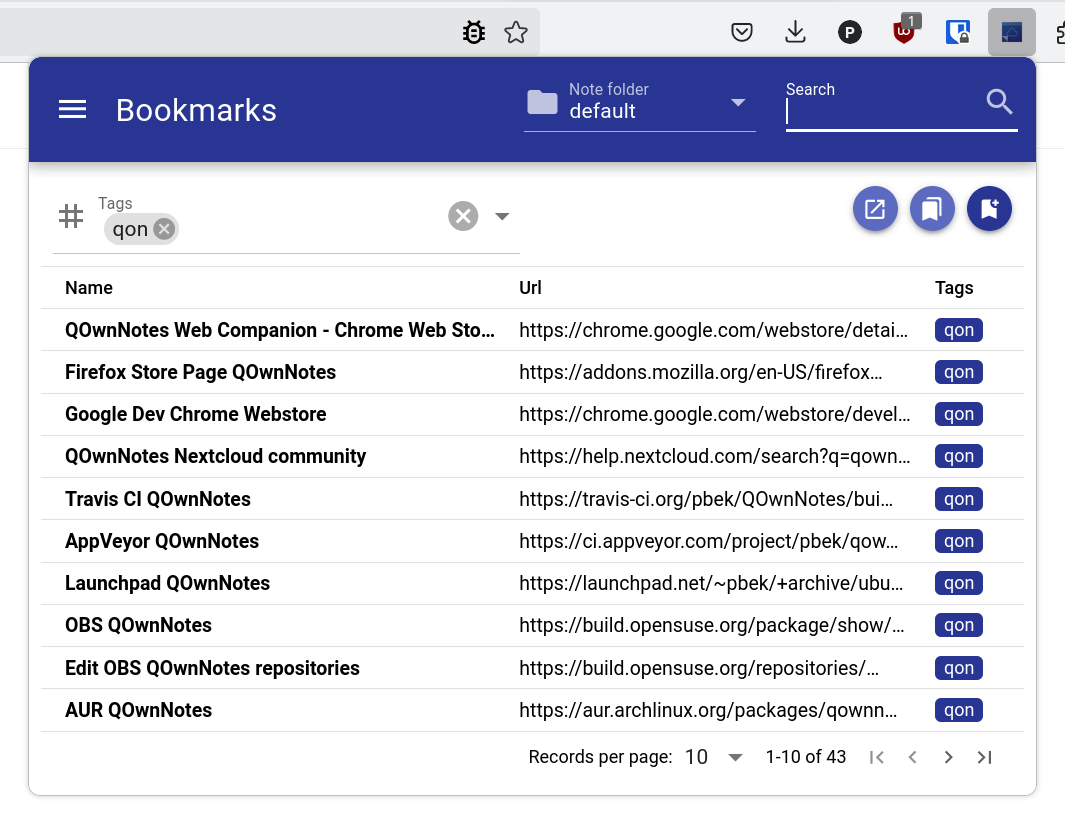
segnalibri

Se vuoi il pieno controllo dei tuoi segnalibri del browser e usarli tra diversi browser e sistemi operativi, allora l'estensione del browser di QOwnNotes fa per te.

Di base l'estensione del browser ti permette di mostrare tutti i collegamenti inseriti sulla nota aperta nell'applicazione in un popup quandi clicchi sull'icona di QOwnNotes dal browser. Questi collegamenti avranno l'etichetta corrente.

Puoi anche gestire i tuoi segnalibri nelle note con l'etichetta segnalibri (modificabile nelle impostazioni). Questi collegamenti possono anche avere etichette e una descrizione che verrà mostrata nell'estensione del browser.

I nuovi segnalibri sono memorizzati in una nota chiamata Segnalibri (anch'essa modificabile nelle impostazioni).

Tips

Puoi anche importare i segnalibri del tuo browser in QOwnNotes con l'estensione browser web companion!

Sintassi dei collegamenti segnalibri

- [Webpage name](https://www.example.com)
- [Webpage name](https://www.example.com) #tag1 #tag2
- [Webpage name](https://www.example.com) some description only
- [Webpage name](https://www.example.com) #tag1 #tag2 some description and tags

* [Webpage name](https://www.example.com) the alternative list character also works

You are able to search for name, url tags or description in the browser extension. In the current note all other links inside of text are parsed, but without tags or description.

Help us improve this page!
Prev
Parametri dell'interfaccia della riga di comando
Next
Gestore dei frammenti di comandi