
AI support
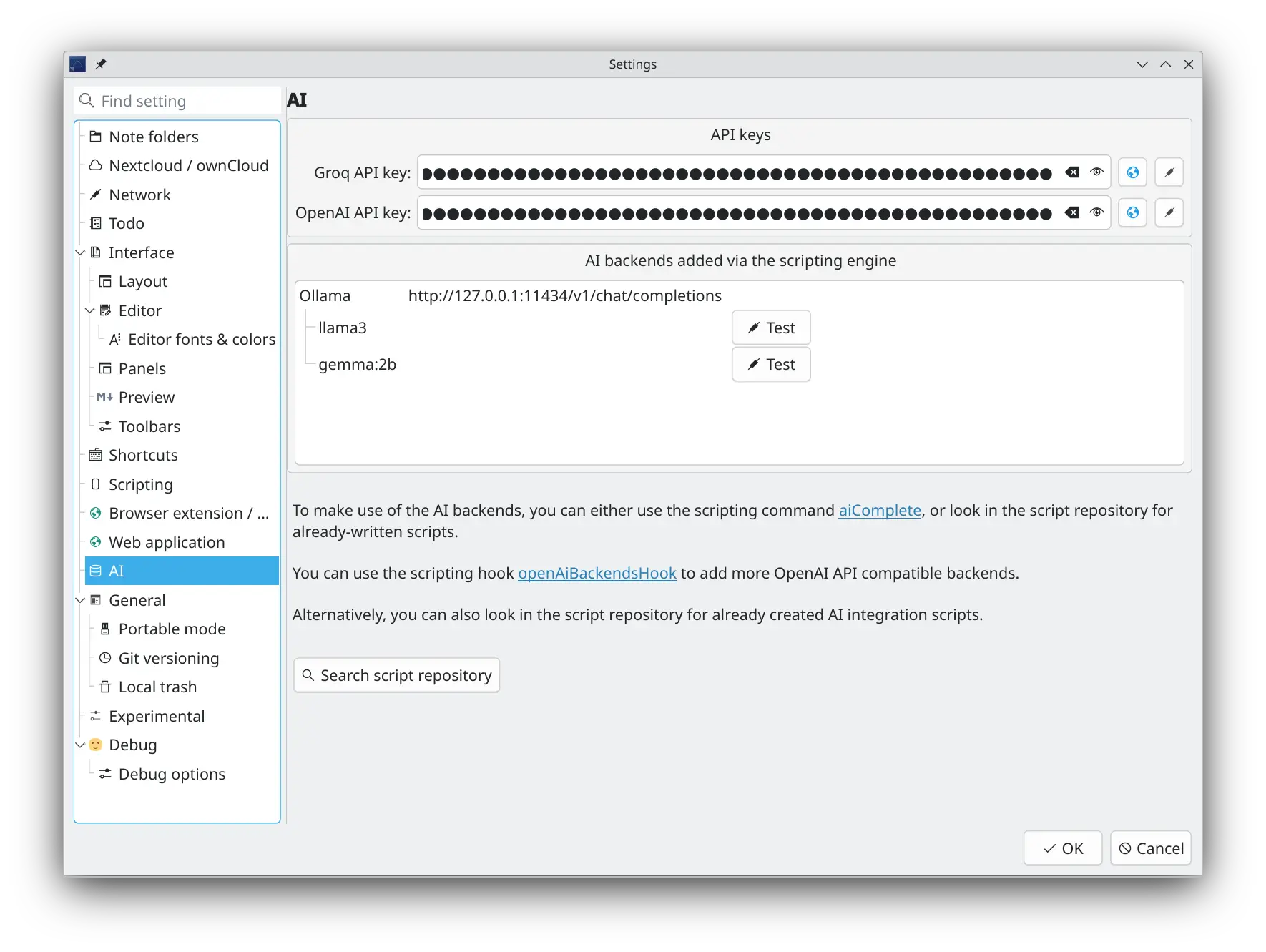
You can opt-in to use your favorite AI model (LLM) to help you with your notes. There is built-in support for Groq (because you can get free API keys) and OpenAI, but the internal API is designed to be easily extendable to other AI models with scripts. There are several AI backend integrations scripts available in the script repository to get you started.
Tips
The OpenAI completion API was implemented to be used in scripts. This way you can do whatever you want and experiment with it.
- There is an AI toolbar and a section in the Edit main menu, where can turn the service on, and you can select the AI backend and model
- You can add an OpenAI and Groq API key in the new AI settings
- Look for more AI backend integrations, like Ollama and llama.cpp in the script repository
- Use the new
script.aiComplete(prompt)scripting command to your own imagination- For more information please take a look at the Scripting documentation
- In the script repository, as a first step, there is a script AI Autocompletion, that uses the selected AI model to autocomplete the current selection in the note text edit, and a script AI Text Tool, that uses the selected AI model to process the current selection in the note text edit, for example to summarize it, to translate it or to fix typos and grammar errors
MCP Server
QOwnNotes includes a built-in MCP (Model Context Protocol) server that allows external AI agents to access your notes over HTTP with Server-Sent Events (SSE) transport.
You can enable and configure the MCP server in the AI / MCP server settings page.
- Enable/disable the MCP server
- Configure the port (default: 22226)
- Bearer token authentication — a security token is auto-generated and must be included as a
Bearertoken in theAuthorizationheader of all requests
Available MCP Tools
The MCP server exposes the following tools to AI agents:
search_notes— Full-text search across all notes in the current note folder. Accepts aquerystring parameter and an optionallimit(default 20). Returns matching note names and a short preview of each.fetch_note— Retrieve the full content of a single note bynameorid. Returns the note text, file name, and note ID.
Connecting an AI Agent
AI agents connect to the MCP server using the HTTP+SSE transport:
- SSE endpoint:
GET http://localhost:22226/sse
Opens a Server-Sent Events stream. The server sends anendpointevent containing the URL for sending JSON-RPC messages. - Message endpoint:
POST http://localhost:22226/message?sessionId=<id>
Send MCP JSON-RPC requests here. The response is delivered over the SSE stream.
All requests must include the header:
Authorization: Bearer <your-security-token>
Example curl Requests
Set the token and port first:
export TOKEN="your-mcp-token"
export PORT=22226
Open the SSE stream in one terminal:
curl -N \
  -H "Accept: text/event-stream" \
  -H "Authorization: Bearer $TOKEN" \
  "http://localhost:$PORT/sse"
The server will send an endpoint event containing a URL like:
event: endpoint
data: http://localhost:22226/message?sessionId=3d8c7b0e-...
Use the sessionId from that event in the following requests. The POST request itself returns 202 Accepted; the JSON-RPC response is delivered over the SSE stream.
Initialize the MCP session:
curl \
  -X POST \
  -H "Content-Type: application/json" \
  -H "Authorization: Bearer $TOKEN" \
  --data '{
    "jsonrpc": "2.0",
    "id": 1,
    "method": "initialize",
    "params": {}
  }' \
  "http://localhost:$PORT/message?sessionId=3d8c7b0e-..."
List the available MCP tools:
curl \
  -X POST \
  -H "Content-Type: application/json" \
  -H "Authorization: Bearer $TOKEN" \
  --data '{
    "jsonrpc": "2.0",
    "id": 2,
    "method": "tools/list",
    "params": {}
  }' \
  "http://localhost:$PORT/message?sessionId=3d8c7b0e-..."
Search notes:
curl \
  -X POST \
  -H "Content-Type: application/json" \
  -H "Authorization: Bearer $TOKEN" \
  --data '{
    "jsonrpc": "2.0",
    "id": 3,
    "method": "tools/call",
    "params": {
      "name": "search_notes",
      "arguments": {
        "query": "meeting notes",
        "limit": 5
      }
    }
  }' \
  "http://localhost:$PORT/message?sessionId=3d8c7b0e-..."
Fetch a note by name:
curl \
  -X POST \
  -H "Content-Type: application/json" \
  -H "Authorization: Bearer $TOKEN" \
  --data '{
    "jsonrpc": "2.0",
    "id": 4,
    "method": "tools/call",
    "params": {
      "name": "fetch_note",
      "arguments": {
        "name": "Daily Journal"
      }
    }
  }' \
  "http://localhost:$PORT/message?sessionId=3d8c7b0e-..."
Fetch a note by ID:
curl \
  -X POST \
  -H "Content-Type: application/json" \
  -H "Authorization: Bearer $TOKEN" \
  --data '{
    "jsonrpc": "2.0",
    "id": 5,
    "method": "tools/call",
    "params": {
      "name": "fetch_note",
      "arguments": {
        "id": 123
      }
    }
  }' \
  "http://localhost:$PORT/message?sessionId=3d8c7b0e-..."