
QOwnNotesQOwnNotes
Iniziare
Installazione
  • Ask question
  • Ask for feature
  • Report bug
  • Telegram Channel
  • Matrix/Element.io Room
  • Gitter Chat
  • IRC Channel
  • Mastodon
  • Twitter
  • Facebook
Donare
  • English
  • Deutsch
  • Italiano
  • Français
  • Español
  • فارسی
  • Nederlands
  • Magyar
  • العربية
  • Polski
  • 한국어
GitHub
Iniziare
Installazione
  • Ask question
  • Ask for feature
  • Report bug
  • Telegram Channel
  • Matrix/Element.io Room
  • Gitter Chat
  • IRC Channel
  • Mastodon
  • Twitter
  • Facebook
Donare
  • English
  • Deutsch
  • Italiano
  • Français
  • Español
  • فارسی
  • Nederlands
  • Magyar
  • العربية
  • Polski
  • 한국어
GitHub
  • Iniziare

    • Panoramica
    • Idea
    • Demo QOwnNotes
    • Markdown
    • Importare le note
    • Parametri dell'interfaccia della riga di comando
    • Estensione del browser QOwnNotes Web Companion
    • Gestore dei frammenti di comandi
    • QOwnNotes Web App
    • QOwnNotesAPI Nextcloud App
    • Note relations panel
    • Alla ricerca di note
    • Tasti di scelta rapida
    • Controllo versioni con Git
  • Installazione

    • Installazione
    • Installa su Ubuntu Linux, Elementary OS e Linux Mint
    • Installa su Microsoft Windows™
    • Installa su macOS™
    • Installa su Debian Linux
    • Installa su openSUSE Linux
    • Installa su Fedora Linux
    • Installa come Snap
    • Installa come Flatpak
    • Installa come AppImage
    • Installa usando Nix
    • Installa su Arch Linux
    • Installa su Solus
    • Installa su KaOS Linux
    • Installa su CentOS Linux
    • Installa su Raspberry Pi OS
    • Installa su Gentoo Linux
    • Installa su Funtoo Linux
    • Installa su Void Linux
    • Installa su Slackware Linux
    • Installa su FreeBSD
    • Creazione di QOwnNotes
  • Editor

    • Controllo ortografico
    • AI support
    • Formati dell'ora
  • Scripting

    • Scripting di QOwnNotes
    • Metodi e oggetti forniti da QOwnNotes
    • Connessioni
    • Classi esposte
  • Contribuire

    • Partecipa
    • Codice di Condotta
    • Manutentori
    • Traduzione
    • Fai una donazione
    • Sponsor
  • FAQ

    • Come faccio a mostrare il pannello di anteprima senza il pannello di modifica delle note?
    • Dove posso trovare ciò che altre persone hanno detto su QOwnNotes?
    • Perché le metriche?
  • Blog (in inglese)

    • /it/blog/
    • /it/blog/2025-07-22-Universal-binary-for-macOS.html
    • /it/blog/2025-03-14-Note-relations-panel.html
    • /it/blog/2024-05-17-AI-support-was-added-to-QOwnNotes.html
    • /it/blog/2023-07-12-Source-Archive-switched-from-TuxFamily-to-GitHub-Releases.html
    • /it/blog/2023-06-17-Nextcloud-Deck-integration-in-QOwnNotes.html
    • /it/blog/2023-06-17-QOwnNotes-UI-End2End-Tests-with-the-help-of-NixOS.html
    • /it/blog/2023-02-03-Test-Qt6-version-of-QOwnNotes-from-a-new-PPA-for-Ubuntu-Linux.html
    • /it/blog/2023-01-29-Evernote-import-for-huge-files.html
    • /it/blog/2022-12-06-Happy-1000th-release-of-QOwnNotes.html
    • /it/blog/2022-10-15-Polish-website-translation.html
    • /it/blog/2022-07-28-Working-with-multiple-notes.html
    • /it/blog/2021-11-23-QOwnNotes-command-line-snippet-manager.html
    • /it/blog/2021-11-15-Nextcloud-note-versions.html
    • /it/blog/2021-11-11-Manage-orphaned-image-files-and-attachments.html
    • /it/blog/2021-10-25-Linking-of-note-headings.html
    • /it/blog/2021-08-31-Tor-Hidden-Service-Webpage.html
    • /it/blog/2021-08-25-Use-workspaces-to-manage-different-kayouts-of-the-user-interface.html
    • /it/blog/2021-08-25-Auto-complete-in-note-editor.html
    • /it/blog/2021-08-22-Open-links-in-the-note-editor.html
    • /it/blog/2021-08-21-Solve-simple-equations-in-the-note-editor.html
    • /it/blog/2021-08-21-Auto-format-markdown-tables.html
    • /it/blog/2021-08-20-QOwnNotes-Mastodon-page.html
    • /it/blog/2021-08-20-Repository-for-Debian-11.html
    • /it/blog/2021-07-18-Joplin-import.html
    • /it/blog/2021-05-02-Send-photos-from-your-mobile-phone-to-QOwnNotes-on-the-desktop.html
    • /it/blog/2021-01-28-Four-new-languages-added-to-the-website.html
    • /it/blog/2021-01-16-QOwnNotes-Demo.html
    • /it/blog/2020-11-10-Markdown-explanation.html
    • /it/blog/2020-11-10-Webpage-translation.html
    • /it/blog/2020-11-08-QOwnNotes-for-Ubuntu-21.04-Hirsute-Hippo.html
    • /it/blog/2020-10-27-QOwnNotes-for-Fedora-33.html
    • /it/blog/2020-10-26-Release-and-blog-posting-automation.html
    • /it/blog/2020-10-26-Legacy-update-service-up-again.html
    • /it/blog/2020-10-23-RSS-Feeds-are-back-in-place.html
    • /it/blog/2019-08-12-Time-Flies-Podcast-episode-with-interview-about-QOwnNotes.html
    • /it/blog/2019-01-16-Bookmark-management-with-QOwnNotes-and-Web-Companion-browser-extension.html
    • /it/blog/2019-01-09-Firefox-extension-on-Firefox-Add-ons-page.html
    • /it/blog/2018-12-31-Chrome-extension-in-Chrome-Web-Store.html
    • /it/blog/2018-12-27-QOwnNotes-Web-Companion-Chrome-extension.html
    • /it/blog/2018-12-23-500th-release-of-QOwnNotes.html
    • /it/blog/2018-10-05-QOwnNotes-Telegram-Group.html
    • /it/blog/2018-08-07-Vim-mode.html
    • /it/blog/2018-03-29-QOwnNotes-for-openSUSE-Leap-15-SUSE-Linux-Enterprise-15-and-SUSE-Linux-Enterprise-12-SP3.html
    • /it/blog/2018-01-11-QOwnNotes-featured-on-LINUX-Unplugged-podcast-and-by-Ubuntu.html
    • /it/blog/2017-12-12-Interview-for-ownCloud.html
    • /it/blog/2017-11-24-QOwnNotes-for-Fedora-27.html
    • /it/blog/2017-10-01-QOwnNotes-reviewed-in-German-magazine-c't.html
    • /it/blog/2017-07-05-QOwnNotesAPI-in-the-ownCloud-Marketplace.html
    • /it/blog/2017-07-03-QOwnNotes-as-AppImage.html
    • /it/blog/2017-06-26-QOwnNotes-for-Debian-9.0-Fedora-26-and-openSUSE-Leap-42.3.html
    • /it/blog/2017-05-19-Script-repository-and-script-settings-variables.html
    • /it/blog/2016-12-20-Fedora-25-release-and-new-documentation-page.html
    • /it/blog/2016-11-23-Solus-package-for-QOwnNotes.html
    • /it/blog/2016-11-05-Automatic-updates-in-Windows-and-macOS.html
    • /it/blog/2016-10-02-Note-encryption-with-keybase.io-or-directly-with-PGP.html
    • /it/blog/2016-09-24-Evernote-import.html
    • /it/blog/2016-09-18-Portable-mode.html
    • /it/blog/2016-09-05-QOwnNotes-on-webupd8.org.html
    • /it/blog/2016-07-12-QOwnNotes-featured-on-the-Linux-Voice-Podcast.html
    • /it/blog/2016-07-12-QOwnNotes-snap.html
    • /it/blog/2016-07-11-QOwnNotes-review-in-British-magazine-Linux-Format.html
    • /it/blog/2016-06-27-QOwnNotes-Slackware-Linux-Repository.html
    • /it/blog/2016-06-22-QOwnNotes-review.html
    • /it/blog/2016-05-25-QOwnNotes-IRC.html
    • /it/blog/2016-05-13-QOwnNotes-now-has-scripting-support.html
    • /it/blog/2016-03-28-QOwnNotes-is-the-Desktop-App-Pick-on-the-Linux-Action-Show.html
    • /it/blog/2016-03-25-QOwnNotes-got-featured-in-Linux-Voice-25.html
    • /it/blog/2016-03-01-QOwnNotes-Gentoo-Linux-Overlay.html
    • /it/blog/2016-02-26-Translate-QOwnNotes-on-Crowdin.html
    • /it/blog/2016-02-14-QOwnNotes-1.0-out-now-in-6-languages-and-with-Freedesktop-theme-icons-support.html
    • /it/blog/2016-01-31-QOwnNotes-software-repository-for-Debian-Linux.html
    • /it/blog/2016-01-30-QOwnNotes-package-on-the-Arch-User-Repository.html
    • /it/blog/2016-01-27-QOwnNotes-software-repository-for-Arch-Linux.html
    • /it/blog/2016-01-26-Webpage-redesign.html
    • /it/blog/2016-01-13-Qt-widget-QMarkdownTextEdit-now-a-separate-project-for-developer's-pleasure.html
    • /it/blog/2016-01-09-New-release-version-RSS-feed.html
    • /it/blog/2016-01-07-New-Linux-software-repositories-and-todo-list-support.html
    • /it/blog/2015-11-04-QOwnNotes-on-Linux-Unplugged.html
    • /it/blog/2015-07-27-Build-and-release-systems-for-QOwnNotes-for-Linux-Mac-OS-X-and-Windows.html
    • /it/blog/2015-03-23-Links-to-other-notes-or-files-are-now-possible-in-QOwnNotes.html
  • Changelog (in inglese)

    • QOwnNotes Changelog

Gestore dei frammenti di comandi

Puoi usare il Gestore dei frammenti di comandi QOwnNotes per eseguire frammenti di comandi memorizzati nelle note in QOwnNotes tramite la linea di comando.
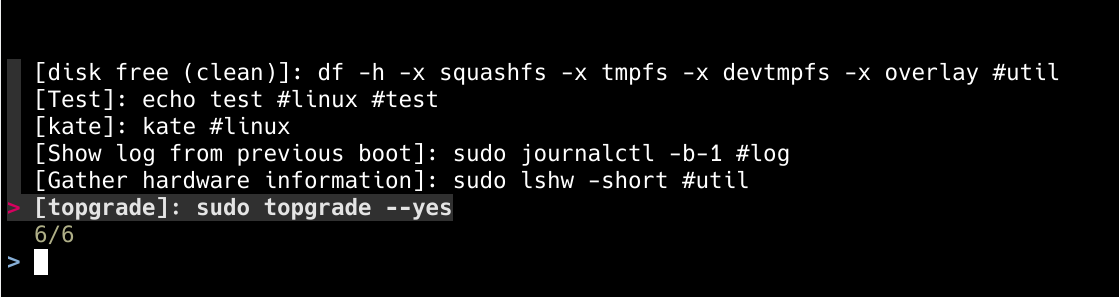
qc

Puoi usare note con etichette speciali per memorizzare frammenti di comandi che puoi eseguire dal gestore dei frammenti di comandi.
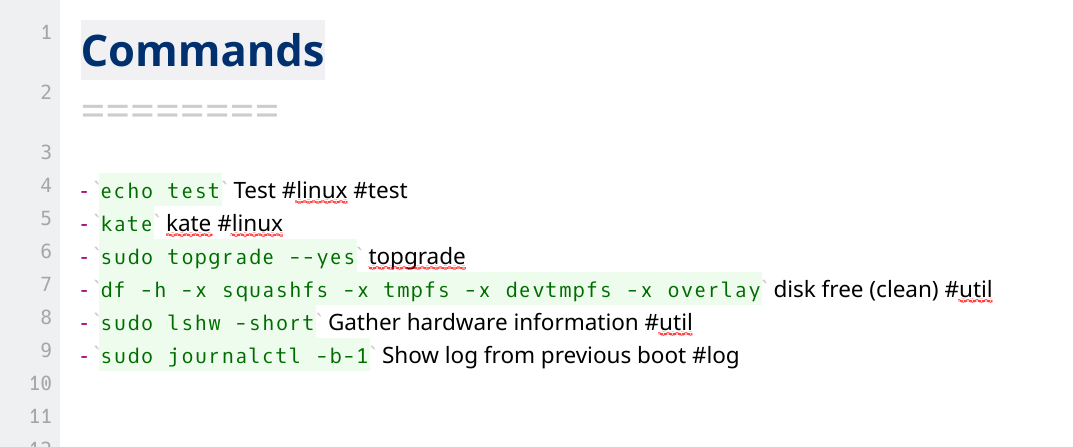
commands

Installazione

Visita la pagina dell'ultimo rilascio e scarica la versione di cui hai bisogno.

Tips

Se hai installato jq puoi usarlo per scaricare e installare, per esempio l'ultima AppImage di Linux AMD64 in /usr/local/bin/qc:

curl https://api.github.com/repos/qownnotes/qc/releases/latest | \
jq '.assets[] | select(.browser_download_url | endswith("_linux_amd64.tar.gz")) | .browser_download_url' | \
xargs curl -Lo /tmp/qc.tar.gz && \
tar xfz /tmp/qc.tar.gz -C /tmp && \
rm /tmp/qc.tar.gz && \
sudo mv /tmp/qc /usr/local/bin/qc && \
/usr/local/bin/qc --version

Dipendenze

fzf (fuzzy search) or peco (più vecchio, ma più probabile che sia installato per impostazione predefinita) deve essere installato per cercare i comandi sulla riga di comando.

Tips

Per impostazione predefinita viene utilizzato fzf per la ricerca, ma puoi utilizzare peco impostandolo con qc configure.

Preparazione
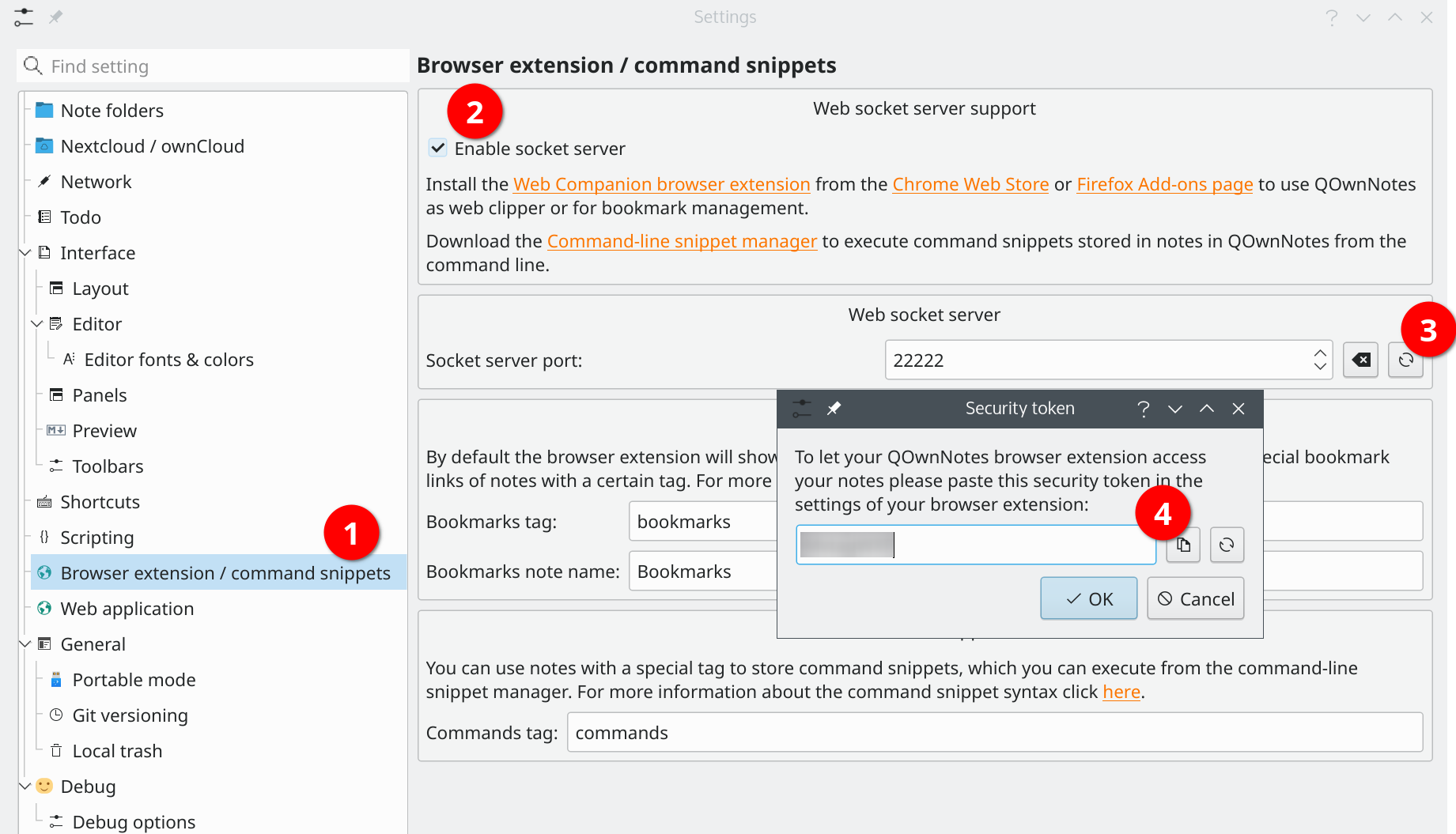
socket-server-token

Before you are using the snippet manager you need to enable the Web socket server (2) in the Browser extension / command snippets (1) settings in QOwnNotes.

Quindi devi mostrare il token di sicurezza (3) e copiarlo (4).

Ora apri il file di configurazione dello snippet manager con:

# Configura il gestore degli snippet
qc configure

E inserisci il token di sicurezza nell'attributo token:

[QOwnNotes]
token = "yourtokenhere"

Tips

Nelle impostazioni di QOwnNotes puoi anche impostare quale tag nota deve essere utilizzato per cercare i comandi nelle note. Per impostazione predefinita, viene utilizzato il tag commands.

Sintassi dei frammenti di comando

Puoi utilizzare elenchi non ordinati con blocchi di codice in linea per memorizzare frammenti di comando. Tutte le note con il tag comandi vengono cercate per frammenti di comando.

Se aggiungi un cmd: prima del blocco di codice in linea, il comando si troverà anche nella nota corrente indipendentemente dai tag della nota.

- `echo I am a command` I am a description #tag1 #tag2 #tag3

* `echo I am also a command` I am a description #tag3 #tag4 #tag5

- cmd: `echo I will be found in the current note` This command will be found in the current note regardless of note tags

<!-- Example for asking for user input -->

- `read -p "PR ID: " id && git fetch origin pull/$id/head:pull-$id && git checkout pull-$id` Ask for pull request ID and checkout pull request

I blocchi di codice bash o shell, preceduti da un'intestazione 2 o superiore come descrizione, possono essere utilizzati anche per frammenti di comando. I tag sono supportati anche se si trovano tra l'intestazione e il blocco di codice.

## Fallo con un blocco di codice "bash".

- questo testo verrà ignorato
- ma si possono usare i tag: #tag1 #tag2

```bash
echo fai questo
 echo fai quest'altro
```


## Fai qualcos'altro con un blocco di codice "sh".

```sh
echo fare qualcos'altro
 echo fai qualcos'altro
```

L'esempio precedente risulterà in due frammenti di comando, il primo con i due tag tag1 e tag2.

Come si usa

# Cerca ed esegui frammenti di comando
qc exec
# Cerca e visualizza frammenti di comando
qc search

Configurazione

Esegui qc configure.

[General]
  editor = "vim"            # il tuo editor di testo preferito
  column = 40               # numero di colonne per la lista comandi
  selectcmd = "fzf"         # selettore per modificare il comando (fzf o peco)
  sortby = ""               # specifica come i frammenti saranno ordinati (recency (predefinito), -recency, description, -description, command, -command, output, -output)

[QOwnNotes]
  token = "MvTagHXF"        # il tuo token API QOwnNotes
  websocket_port = 22222    # porta websocket di QOwnNotes

Completamento console

Puoi generare il codice per il completamento da console per la tua shell con qc completion <shell>.

Per esempio, per la Fish shell puoi usare:

qc completion fish > ~/.config/fish/completions/qc.fish
Help us improve this page!
Prev
Estensione del browser QOwnNotes Web Companion
Next
QOwnNotes Web App