
QOwnNotesQOwnNotes
Iniziare
Installazione
  • Ask question
  • Ask for feature
  • Report bug
  • Telegram Channel
  • Matrix/Element.io Room
  • Gitter Chat
  • IRC Channel
  • Mastodon
  • Twitter
  • Facebook
Donare
  • English
  • Deutsch
  • Italiano
  • Français
  • Español
  • فارسی
  • Nederlands
  • Magyar
  • العربية
  • Polski
  • 한국어
GitHub
Iniziare
Installazione
  • Ask question
  • Ask for feature
  • Report bug
  • Telegram Channel
  • Matrix/Element.io Room
  • Gitter Chat
  • IRC Channel
  • Mastodon
  • Twitter
  • Facebook
Donare
  • English
  • Deutsch
  • Italiano
  • Français
  • Español
  • فارسی
  • Nederlands
  • Magyar
  • العربية
  • Polski
  • 한국어
GitHub
  • Iniziare

    • Panoramica
    • Idea
    • Demo QOwnNotes
    • Markdown
    • Importare le note
    • Parametri dell'interfaccia della riga di comando
    • Estensione del browser QOwnNotes Web Companion
    • Gestore dei frammenti di comandi
    • QOwnNotes Web App
    • QOwnNotesAPI Nextcloud App
    • Note relations panel
    • Alla ricerca di note
    • Tasti di scelta rapida
    • Controllo versioni con Git
  • Installazione

    • Installazione
    • Installa su Ubuntu Linux, Elementary OS e Linux Mint
    • Installa su Microsoft Windows™
    • Installa su macOS™
    • Installa su Debian Linux
    • Installa su openSUSE Linux
    • Installa su Fedora Linux
    • Installa come Snap
    • Installa come Flatpak
    • Installa come AppImage
    • Installa usando Nix
    • Installa su Arch Linux
    • Installa su Solus
    • Installa su KaOS Linux
    • Installa su CentOS Linux
    • Installa su Raspberry Pi OS
    • Installa su Gentoo Linux
    • Installa su Funtoo Linux
    • Installa su Void Linux
    • Installa su Slackware Linux
    • Installa su FreeBSD
    • Creazione di QOwnNotes
  • Editor

    • Controllo ortografico
    • AI support
    • Formati dell'ora
  • Scripting

    • Scripting di QOwnNotes
    • Metodi e oggetti forniti da QOwnNotes
    • Connessioni
    • Classi esposte
  • Contribuire

    • Partecipa
    • Codice di Condotta
    • Manutentori
    • Traduzione
    • Fai una donazione
    • Sponsor
  • FAQ

    • Come faccio a mostrare il pannello di anteprima senza il pannello di modifica delle note?
    • Dove posso trovare ciò che altre persone hanno detto su QOwnNotes?
    • Perché le metriche?
  • Blog (in inglese)

    • /it/blog/
    • /it/blog/2025-07-22-Universal-binary-for-macOS.html
    • /it/blog/2025-03-14-Note-relations-panel.html
    • /it/blog/2024-05-17-AI-support-was-added-to-QOwnNotes.html
    • /it/blog/2023-07-12-Source-Archive-switched-from-TuxFamily-to-GitHub-Releases.html
    • /it/blog/2023-06-17-Nextcloud-Deck-integration-in-QOwnNotes.html
    • /it/blog/2023-06-17-QOwnNotes-UI-End2End-Tests-with-the-help-of-NixOS.html
    • /it/blog/2023-02-03-Test-Qt6-version-of-QOwnNotes-from-a-new-PPA-for-Ubuntu-Linux.html
    • /it/blog/2023-01-29-Evernote-import-for-huge-files.html
    • /it/blog/2022-12-06-Happy-1000th-release-of-QOwnNotes.html
    • /it/blog/2022-10-15-Polish-website-translation.html
    • /it/blog/2022-07-28-Working-with-multiple-notes.html
    • /it/blog/2021-11-23-QOwnNotes-command-line-snippet-manager.html
    • /it/blog/2021-11-15-Nextcloud-note-versions.html
    • /it/blog/2021-11-11-Manage-orphaned-image-files-and-attachments.html
    • /it/blog/2021-10-25-Linking-of-note-headings.html
    • /it/blog/2021-08-31-Tor-Hidden-Service-Webpage.html
    • /it/blog/2021-08-25-Use-workspaces-to-manage-different-kayouts-of-the-user-interface.html
    • /it/blog/2021-08-25-Auto-complete-in-note-editor.html
    • /it/blog/2021-08-22-Open-links-in-the-note-editor.html
    • /it/blog/2021-08-21-Solve-simple-equations-in-the-note-editor.html
    • /it/blog/2021-08-21-Auto-format-markdown-tables.html
    • /it/blog/2021-08-20-QOwnNotes-Mastodon-page.html
    • /it/blog/2021-08-20-Repository-for-Debian-11.html
    • /it/blog/2021-07-18-Joplin-import.html
    • /it/blog/2021-05-02-Send-photos-from-your-mobile-phone-to-QOwnNotes-on-the-desktop.html
    • /it/blog/2021-01-28-Four-new-languages-added-to-the-website.html
    • /it/blog/2021-01-16-QOwnNotes-Demo.html
    • /it/blog/2020-11-10-Markdown-explanation.html
    • /it/blog/2020-11-10-Webpage-translation.html
    • /it/blog/2020-11-08-QOwnNotes-for-Ubuntu-21.04-Hirsute-Hippo.html
    • /it/blog/2020-10-27-QOwnNotes-for-Fedora-33.html
    • /it/blog/2020-10-26-Release-and-blog-posting-automation.html
    • /it/blog/2020-10-26-Legacy-update-service-up-again.html
    • /it/blog/2020-10-23-RSS-Feeds-are-back-in-place.html
    • /it/blog/2019-08-12-Time-Flies-Podcast-episode-with-interview-about-QOwnNotes.html
    • /it/blog/2019-01-16-Bookmark-management-with-QOwnNotes-and-Web-Companion-browser-extension.html
    • /it/blog/2019-01-09-Firefox-extension-on-Firefox-Add-ons-page.html
    • /it/blog/2018-12-31-Chrome-extension-in-Chrome-Web-Store.html
    • /it/blog/2018-12-27-QOwnNotes-Web-Companion-Chrome-extension.html
    • /it/blog/2018-12-23-500th-release-of-QOwnNotes.html
    • /it/blog/2018-10-05-QOwnNotes-Telegram-Group.html
    • /it/blog/2018-08-07-Vim-mode.html
    • /it/blog/2018-03-29-QOwnNotes-for-openSUSE-Leap-15-SUSE-Linux-Enterprise-15-and-SUSE-Linux-Enterprise-12-SP3.html
    • /it/blog/2018-01-11-QOwnNotes-featured-on-LINUX-Unplugged-podcast-and-by-Ubuntu.html
    • /it/blog/2017-12-12-Interview-for-ownCloud.html
    • /it/blog/2017-11-24-QOwnNotes-for-Fedora-27.html
    • /it/blog/2017-10-01-QOwnNotes-reviewed-in-German-magazine-c't.html
    • /it/blog/2017-07-05-QOwnNotesAPI-in-the-ownCloud-Marketplace.html
    • /it/blog/2017-07-03-QOwnNotes-as-AppImage.html
    • /it/blog/2017-06-26-QOwnNotes-for-Debian-9.0-Fedora-26-and-openSUSE-Leap-42.3.html
    • /it/blog/2017-05-19-Script-repository-and-script-settings-variables.html
    • /it/blog/2016-12-20-Fedora-25-release-and-new-documentation-page.html
    • /it/blog/2016-11-23-Solus-package-for-QOwnNotes.html
    • /it/blog/2016-11-05-Automatic-updates-in-Windows-and-macOS.html
    • /it/blog/2016-10-02-Note-encryption-with-keybase.io-or-directly-with-PGP.html
    • /it/blog/2016-09-24-Evernote-import.html
    • /it/blog/2016-09-18-Portable-mode.html
    • /it/blog/2016-09-05-QOwnNotes-on-webupd8.org.html
    • /it/blog/2016-07-12-QOwnNotes-featured-on-the-Linux-Voice-Podcast.html
    • /it/blog/2016-07-12-QOwnNotes-snap.html
    • /it/blog/2016-07-11-QOwnNotes-review-in-British-magazine-Linux-Format.html
    • /it/blog/2016-06-27-QOwnNotes-Slackware-Linux-Repository.html
    • /it/blog/2016-06-22-QOwnNotes-review.html
    • /it/blog/2016-05-25-QOwnNotes-IRC.html
    • /it/blog/2016-05-13-QOwnNotes-now-has-scripting-support.html
    • /it/blog/2016-03-28-QOwnNotes-is-the-Desktop-App-Pick-on-the-Linux-Action-Show.html
    • /it/blog/2016-03-25-QOwnNotes-got-featured-in-Linux-Voice-25.html
    • /it/blog/2016-03-01-QOwnNotes-Gentoo-Linux-Overlay.html
    • /it/blog/2016-02-26-Translate-QOwnNotes-on-Crowdin.html
    • /it/blog/2016-02-14-QOwnNotes-1.0-out-now-in-6-languages-and-with-Freedesktop-theme-icons-support.html
    • /it/blog/2016-01-31-QOwnNotes-software-repository-for-Debian-Linux.html
    • /it/blog/2016-01-30-QOwnNotes-package-on-the-Arch-User-Repository.html
    • /it/blog/2016-01-27-QOwnNotes-software-repository-for-Arch-Linux.html
    • /it/blog/2016-01-26-Webpage-redesign.html
    • /it/blog/2016-01-13-Qt-widget-QMarkdownTextEdit-now-a-separate-project-for-developer's-pleasure.html
    • /it/blog/2016-01-09-New-release-version-RSS-feed.html
    • /it/blog/2016-01-07-New-Linux-software-repositories-and-todo-list-support.html
    • /it/blog/2015-11-04-QOwnNotes-on-Linux-Unplugged.html
    • /it/blog/2015-07-27-Build-and-release-systems-for-QOwnNotes-for-Linux-Mac-OS-X-and-Windows.html
    • /it/blog/2015-03-23-Links-to-other-notes-or-files-are-now-possible-in-QOwnNotes.html
  • Changelog (in inglese)

    • QOwnNotes Changelog

Demo QOwnNotes

Tips

Note This might not always work, depending on the current state of the demo environment.

Puoi provare QOwnNotes nel tuo browser web senza installarlo seguendo queste istruzioni:

  1. Click on this Play With Docker link.
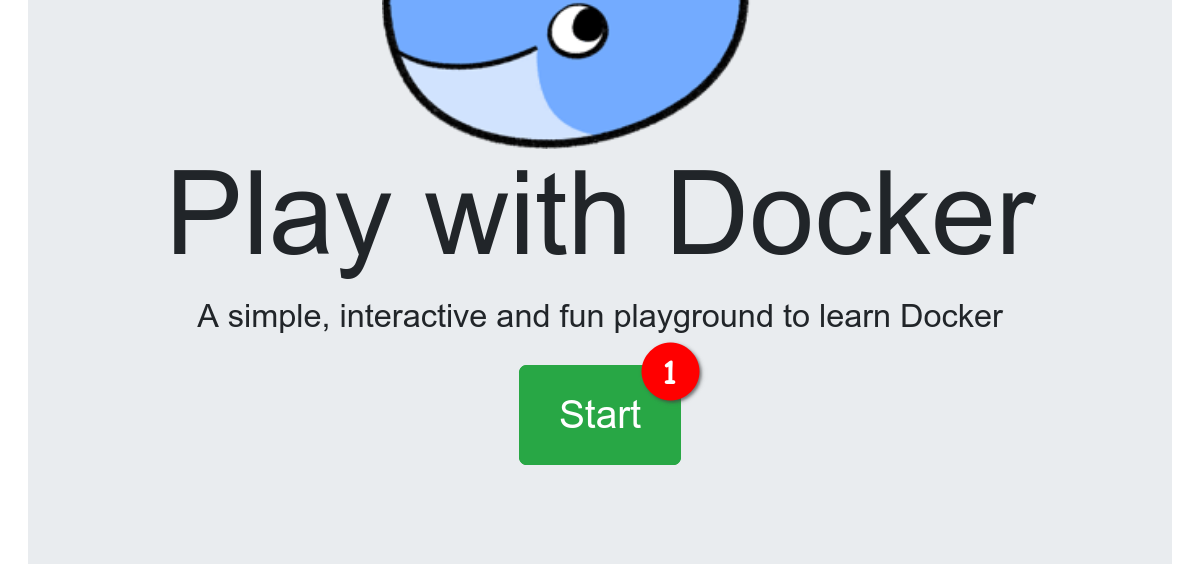
  2. Click the Login / Start button (see screenshot bullet 1) and login with your Docker account (you need to create one if you don't already have one).
screenshot01

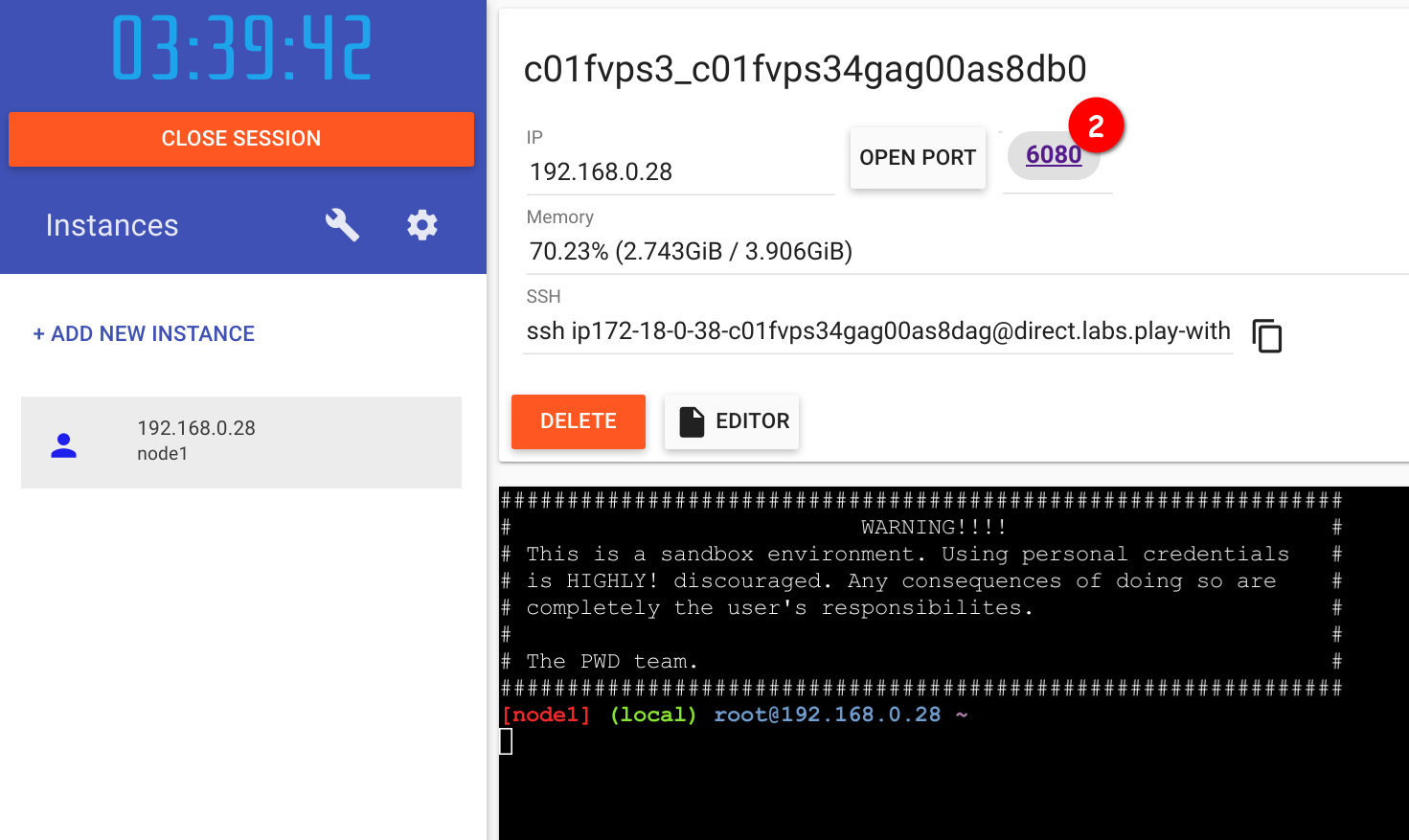
  1. Wait until the container is created and spun up. Then you should be able to click on 6080 on the top (see screenshot bullet 2). If you get an error please wait a bit more and try to click 6080 again, it takes a while for the desktop environment to load.
screenshot02

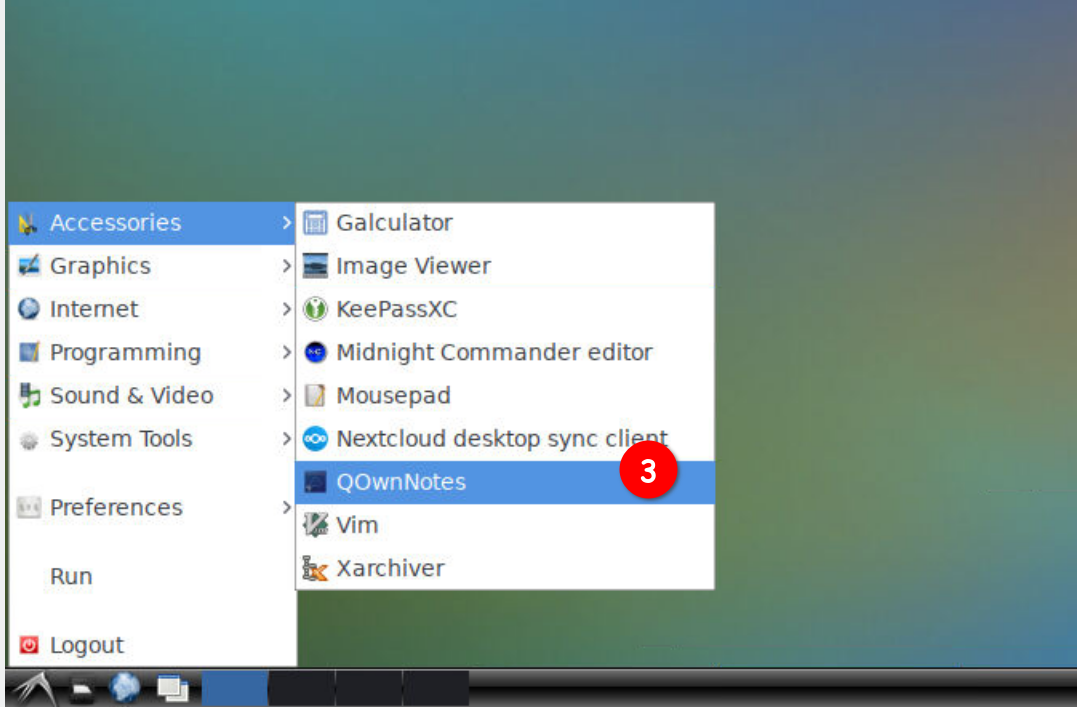
  1. A new browser tab should open producing a desktop. Click on the bottom left symbol on the screen (in the task bar), hover over Accessories and click on QOwnNotes (see screenshot bullet 3).
screenshot03

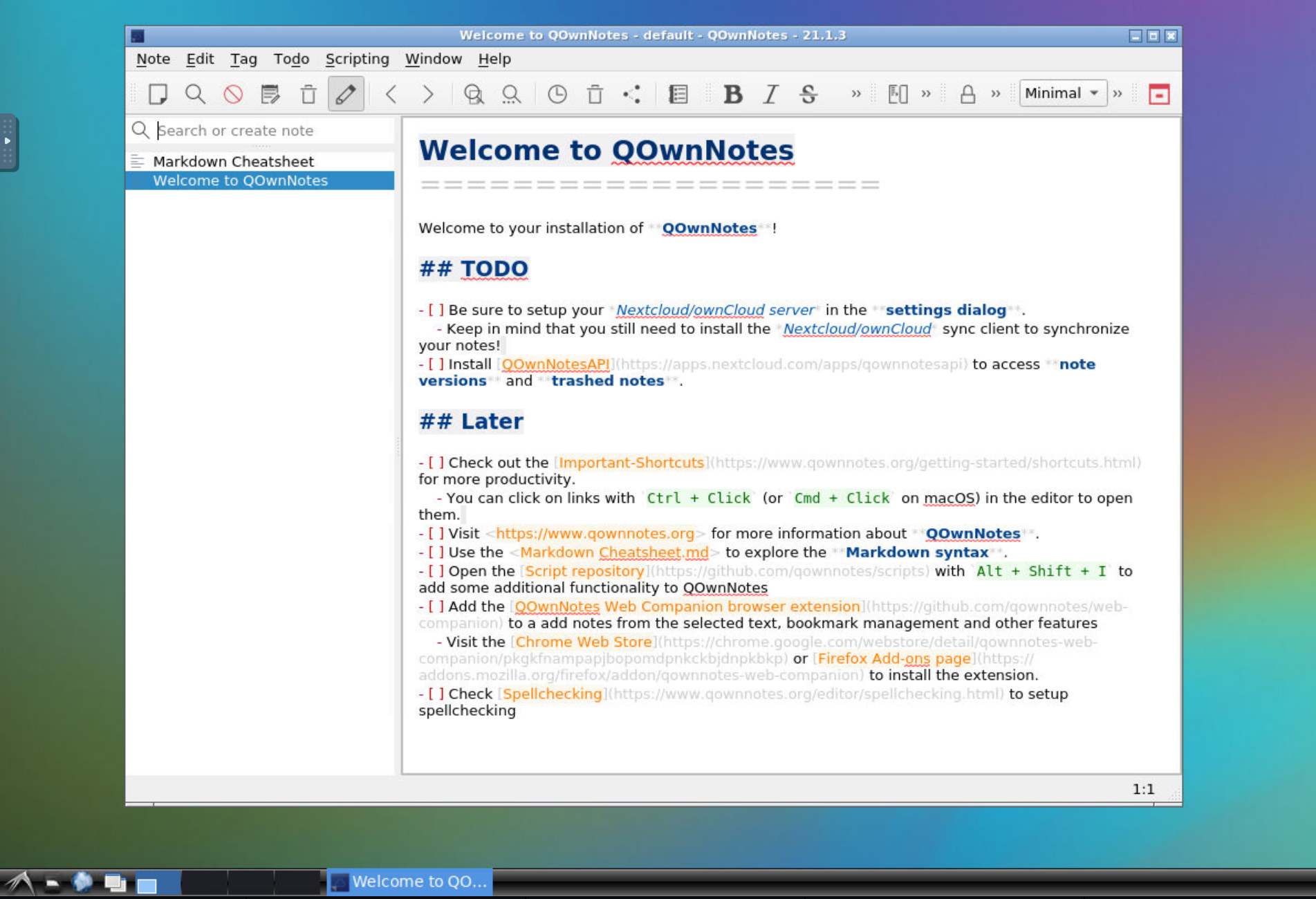
  1. The QOwnNotes install dialog should open, click through it and press Finish to see the QOwnNotes main window.
screenshot04

Help us improve this page!
Prev
Idea
Next
Markdown