
QOwnNotesQOwnNotes
Kezdő lépések
Telepítés
  • Ask question
  • Ask for feature
  • Report bug
  • Telegram Channel
  • Matrix/Element.io Room
  • Gitter Chat
  • IRC Channel
  • Mastodon
  • Twitter
  • Facebook
Adományozás
  • English
  • Deutsch
  • Italiano
  • Français
  • Español
  • فارسی
  • Nederlands
  • Magyar
  • العربية
  • Polski
  • 한국어
GitHub
Kezdő lépések
Telepítés
  • Ask question
  • Ask for feature
  • Report bug
  • Telegram Channel
  • Matrix/Element.io Room
  • Gitter Chat
  • IRC Channel
  • Mastodon
  • Twitter
  • Facebook
Adományozás
  • English
  • Deutsch
  • Italiano
  • Français
  • Español
  • فارسی
  • Nederlands
  • Magyar
  • العربية
  • Polski
  • 한국어
GitHub
  • Kezdő lépések

    • Áttekintés
    • Koncepció
    • QOwnNotes Demo
    • Markdown
    • Jegyzetek importálása
    • Parancssori interfész paraméterek
    • QOwnNotes Web Companion böngészőbővítmény
    • Command-line Snippet Manager
    • QOwnNotes webalkalmazás
    • QOwnNotesAPI Nextcloud App
    • Note relations panel
    • Jegyzetek keresése
    • Parancsikonok
    • Git versioning
  • Telepítés

    • Telepítés
    • Telepítse az Ubuntu Linux-ra, az elemi operációs rendszerre és a Linux Mint-re
    • Telepítse a Microsoft Windows™ rendszerre
    • Telepítse a macOS™ -ra
    • Telepítés a Debian Linux rendszerre
    • Install on openSUSE Linux
    • Telepítés Fedora Linux rendszerre
    • Install as Snap
    • Telepítés Flatpak néven
    • Telepítés AppImage néven
    • Install via Nix
    • Telepítés Arch Linux rendszerre
    • Telepítse Solus-ra
    • Telepítés KaOS Linux rendszerre
    • Telepítés a CentOS Linux rendszerre
    • Telepítés Raspberry Pi OS-re
    • Telepítés a Gentoo Linux rendszerre
    • Telepítse Funtoo Linuxra
    • Telepítse Void Linuxra
    • Telepítse a Slackware Linux rendszerre
    • Telepítse a FreeBSD-re
    • A QOwnNotes építése
  • Szerkesztő

    • Helyesírás-ellenőrzés
    • AI support
    • Időformátumok:
  • Szkriptelés

    • QOwnNotes szkriptek
    • Módszerek és objektumok, amelyeket a QOwnNotes biztosít
    • Hooks
    • Kitett osztályok
  • Közreműködés

    • Bekapcsolódás
    • Code of Conduct
    • Fenntartók
    • Fordítás
    • Adományozás
    • Sponzorok
  • GYIK

    • Hogyan jeleníthetem meg az előnézeti panelt a jegyzetszerkesztő panel nélkül?
    • Hol találom, amit mások mondtak a QOwnNotes-ról?
    • Mire használjuk a mérőszámokat?
  • Blog (angolul)

    • /hu/blog/
    • /hu/blog/2025-07-22-Universal-binary-for-macOS.html
    • /hu/blog/2025-03-14-Note-relations-panel.html
    • /hu/blog/2024-05-17-AI-support-was-added-to-QOwnNotes.html
    • /hu/blog/2023-07-12-Source-Archive-switched-from-TuxFamily-to-GitHub-Releases.html
    • /hu/blog/2023-06-17-Nextcloud-Deck-integration-in-QOwnNotes.html
    • /hu/blog/2023-06-17-QOwnNotes-UI-End2End-Tests-with-the-help-of-NixOS.html
    • /hu/blog/2023-02-03-Test-Qt6-version-of-QOwnNotes-from-a-new-PPA-for-Ubuntu-Linux.html
    • /hu/blog/2023-01-29-Evernote-import-for-huge-files.html
    • /hu/blog/2022-12-06-Happy-1000th-release-of-QOwnNotes.html
    • /hu/blog/2022-10-15-Polish-website-translation.html
    • /hu/blog/2022-07-28-Working-with-multiple-notes.html
    • /hu/blog/2021-11-23-QOwnNotes-command-line-snippet-manager.html
    • /hu/blog/2021-11-15-Nextcloud-note-versions.html
    • /hu/blog/2021-11-11-Manage-orphaned-image-files-and-attachments.html
    • /hu/blog/2021-10-25-Linking-of-note-headings.html
    • /hu/blog/2021-08-31-Tor-Hidden-Service-Webpage.html
    • /hu/blog/2021-08-25-Use-workspaces-to-manage-different-kayouts-of-the-user-interface.html
    • /hu/blog/2021-08-25-Auto-complete-in-note-editor.html
    • /hu/blog/2021-08-22-Open-links-in-the-note-editor.html
    • /hu/blog/2021-08-21-Solve-simple-equations-in-the-note-editor.html
    • /hu/blog/2021-08-21-Auto-format-markdown-tables.html
    • /hu/blog/2021-08-20-QOwnNotes-Mastodon-page.html
    • /hu/blog/2021-08-20-Repository-for-Debian-11.html
    • /hu/blog/2021-07-18-Joplin-import.html
    • /hu/blog/2021-05-02-Send-photos-from-your-mobile-phone-to-QOwnNotes-on-the-desktop.html
    • /hu/blog/2021-01-28-Four-new-languages-added-to-the-website.html
    • /hu/blog/2021-01-16-QOwnNotes-Demo.html
    • /hu/blog/2020-11-10-Markdown-explanation.html
    • /hu/blog/2020-11-10-Webpage-translation.html
    • /hu/blog/2020-11-08-QOwnNotes-for-Ubuntu-21.04-Hirsute-Hippo.html
    • /hu/blog/2020-10-27-QOwnNotes-for-Fedora-33.html
    • /hu/blog/2020-10-26-Release-and-blog-posting-automation.html
    • /hu/blog/2020-10-26-Legacy-update-service-up-again.html
    • /hu/blog/2020-10-23-RSS-Feeds-are-back-in-place.html
    • /hu/blog/2019-08-12-Time-Flies-Podcast-episode-with-interview-about-QOwnNotes.html
    • /hu/blog/2019-01-16-Bookmark-management-with-QOwnNotes-and-Web-Companion-browser-extension.html
    • /hu/blog/2019-01-09-Firefox-extension-on-Firefox-Add-ons-page.html
    • /hu/blog/2018-12-31-Chrome-extension-in-Chrome-Web-Store.html
    • /hu/blog/2018-12-27-QOwnNotes-Web-Companion-Chrome-extension.html
    • /hu/blog/2018-12-23-500th-release-of-QOwnNotes.html
    • /hu/blog/2018-10-05-QOwnNotes-Telegram-Group.html
    • /hu/blog/2018-08-07-Vim-mode.html
    • /hu/blog/2018-03-29-QOwnNotes-for-openSUSE-Leap-15-SUSE-Linux-Enterprise-15-and-SUSE-Linux-Enterprise-12-SP3.html
    • /hu/blog/2018-01-11-QOwnNotes-featured-on-LINUX-Unplugged-podcast-and-by-Ubuntu.html
    • /hu/blog/2017-12-12-Interview-for-ownCloud.html
    • /hu/blog/2017-11-24-QOwnNotes-for-Fedora-27.html
    • /hu/blog/2017-10-01-QOwnNotes-reviewed-in-German-magazine-c't.html
    • /hu/blog/2017-07-05-QOwnNotesAPI-in-the-ownCloud-Marketplace.html
    • /hu/blog/2017-07-03-QOwnNotes-as-AppImage.html
    • /hu/blog/2017-06-26-QOwnNotes-for-Debian-9.0-Fedora-26-and-openSUSE-Leap-42.3.html
    • /hu/blog/2017-05-19-Script-repository-and-script-settings-variables.html
    • /hu/blog/2016-12-20-Fedora-25-release-and-new-documentation-page.html
    • /hu/blog/2016-11-23-Solus-package-for-QOwnNotes.html
    • /hu/blog/2016-11-05-Automatic-updates-in-Windows-and-macOS.html
    • /hu/blog/2016-10-02-Note-encryption-with-keybase.io-or-directly-with-PGP.html
    • /hu/blog/2016-09-24-Evernote-import.html
    • /hu/blog/2016-09-18-Portable-mode.html
    • /hu/blog/2016-09-05-QOwnNotes-on-webupd8.org.html
    • /hu/blog/2016-07-12-QOwnNotes-featured-on-the-Linux-Voice-Podcast.html
    • /hu/blog/2016-07-12-QOwnNotes-snap.html
    • /hu/blog/2016-07-11-QOwnNotes-review-in-British-magazine-Linux-Format.html
    • /hu/blog/2016-06-27-QOwnNotes-Slackware-Linux-Repository.html
    • /hu/blog/2016-06-22-QOwnNotes-review.html
    • /hu/blog/2016-05-25-QOwnNotes-IRC.html
    • /hu/blog/2016-05-13-QOwnNotes-now-has-scripting-support.html
    • /hu/blog/2016-03-28-QOwnNotes-is-the-Desktop-App-Pick-on-the-Linux-Action-Show.html
    • /hu/blog/2016-03-25-QOwnNotes-got-featured-in-Linux-Voice-25.html
    • /hu/blog/2016-03-01-QOwnNotes-Gentoo-Linux-Overlay.html
    • /hu/blog/2016-02-26-Translate-QOwnNotes-on-Crowdin.html
    • /hu/blog/2016-02-14-QOwnNotes-1.0-out-now-in-6-languages-and-with-Freedesktop-theme-icons-support.html
    • /hu/blog/2016-01-31-QOwnNotes-software-repository-for-Debian-Linux.html
    • /hu/blog/2016-01-30-QOwnNotes-package-on-the-Arch-User-Repository.html
    • /hu/blog/2016-01-27-QOwnNotes-software-repository-for-Arch-Linux.html
    • /hu/blog/2016-01-26-Webpage-redesign.html
    • /hu/blog/2016-01-13-Qt-widget-QMarkdownTextEdit-now-a-separate-project-for-developer's-pleasure.html
    • /hu/blog/2016-01-09-New-release-version-RSS-feed.html
    • /hu/blog/2016-01-07-New-Linux-software-repositories-and-todo-list-support.html
    • /hu/blog/2015-11-04-QOwnNotes-on-Linux-Unplugged.html
    • /hu/blog/2015-07-27-Build-and-release-systems-for-QOwnNotes-for-Linux-Mac-OS-X-and-Windows.html
    • /hu/blog/2015-03-23-Links-to-other-notes-or-files-are-now-possible-in-QOwnNotes.html
  • Változásnapló (angolul)

    • QOwnNotes Changelog

QOwnNotes Demo

Tipp

Note This might not always work, depending on the current state of the demo environment.

A következő utasításokat követve kipróbálhatja a QOwnNotes t webböngészőjében telepítés nélkül.

  1. Click on this Play With Docker link.
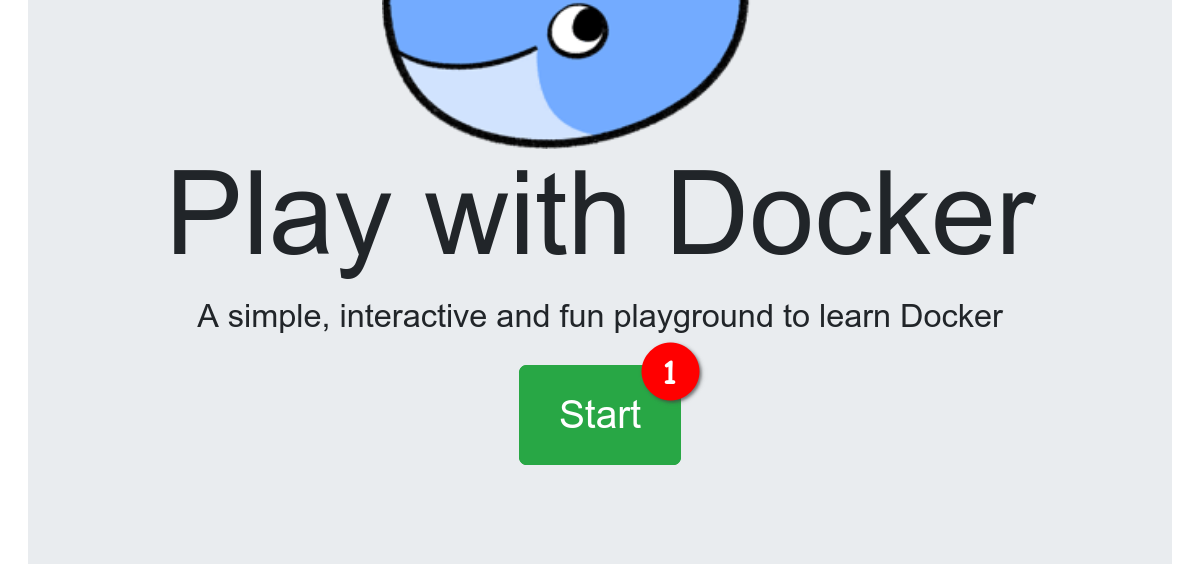
  2. Click the Login / Start button (see screenshot bullet 1) and login with your Docker account (you need to create one if you don't already have one).
screenshot01

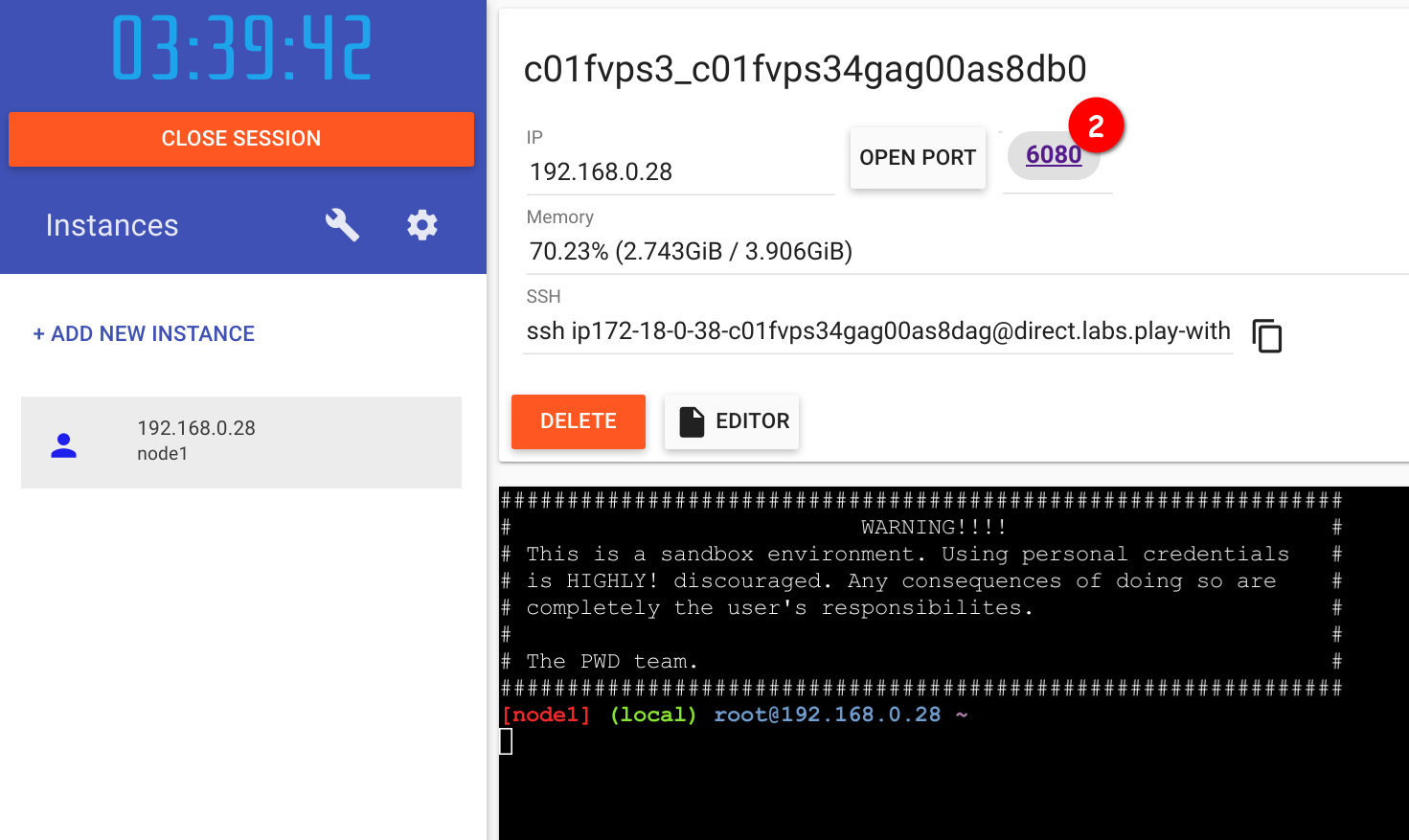
  1. Wait until the container is created and spun up. Then you should be able to click on 6080 on the top (see screenshot bullet 2). If you get an error please wait a bit more and try to click 6080 again, it takes a while for the desktop environment to load.
screenshot02

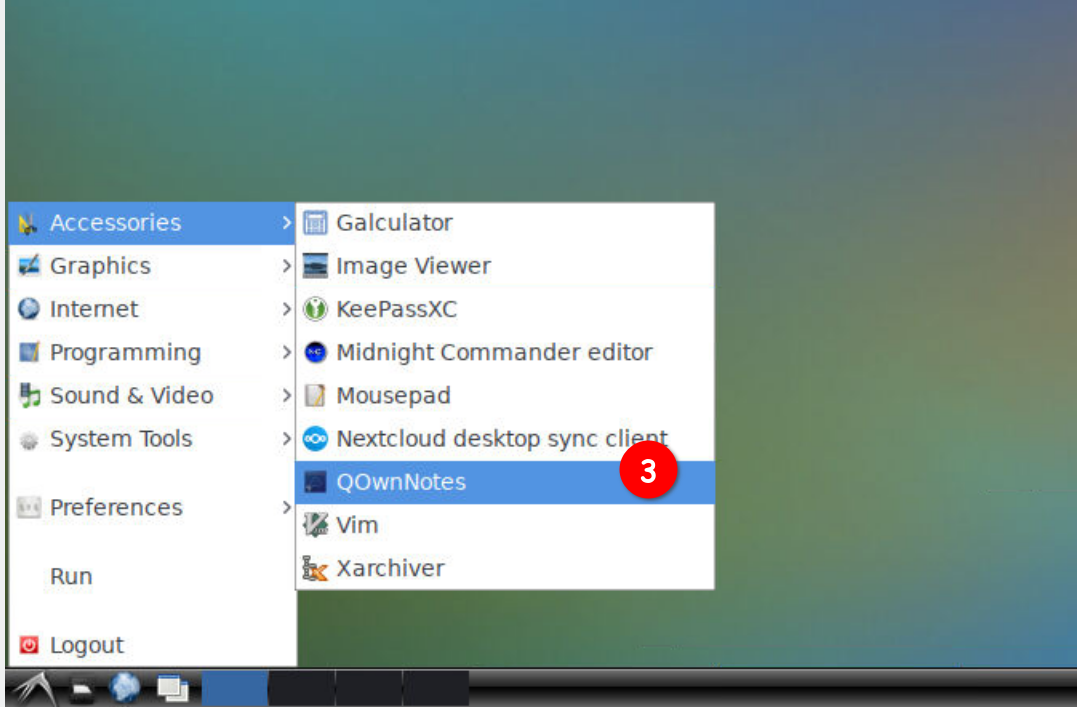
  1. A new browser tab should open producing a desktop. Click on the bottom left symbol on the screen (in the task bar), hover over Accessories and click on QOwnNotes (see screenshot bullet 3).
screenshot03

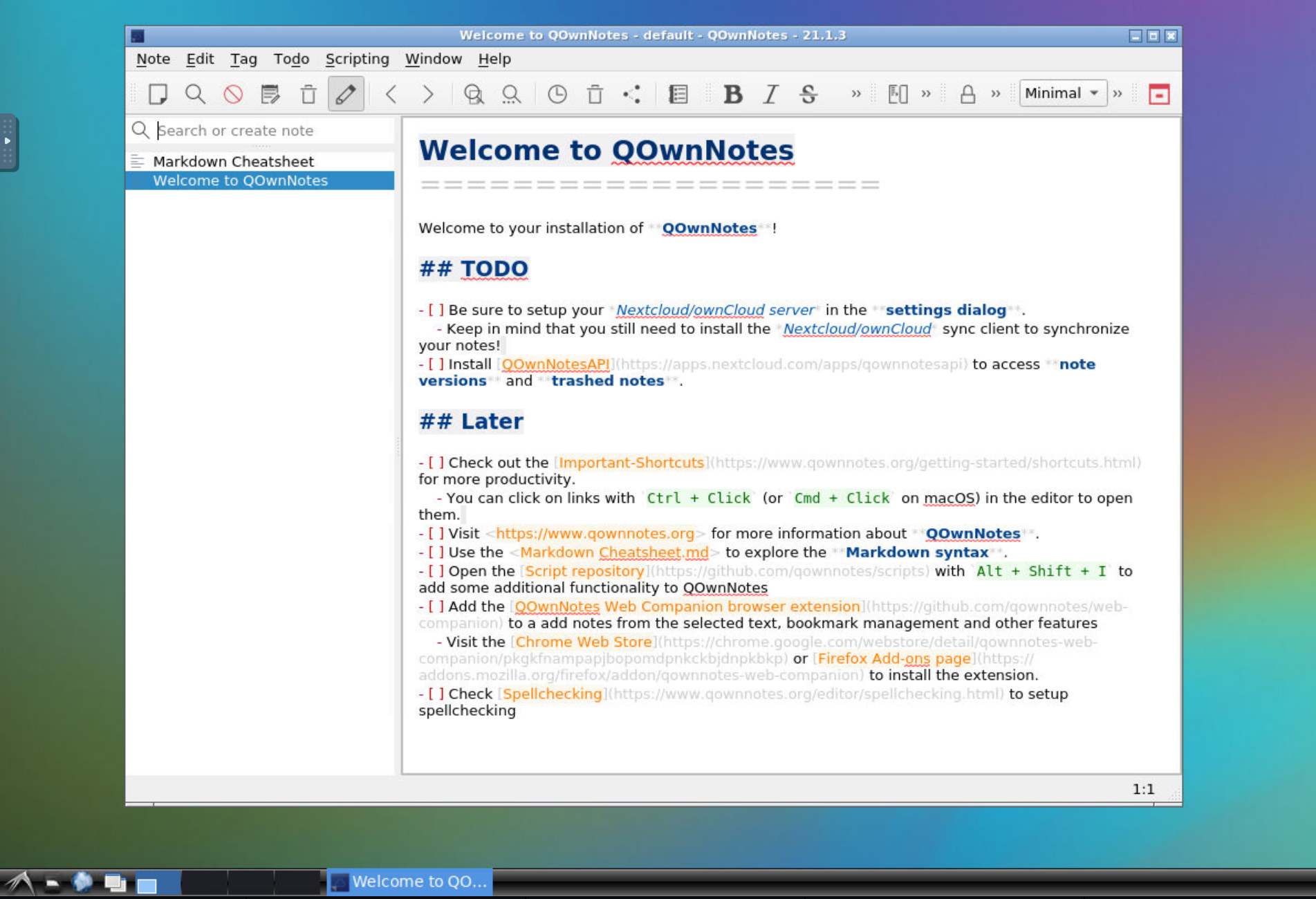
  1. The QOwnNotes install dialog should open, click through it and press Finish to see the QOwnNotes main window.
screenshot04

Help us improve this page!
Prev
Koncepció
Next
Markdown