
QOwnNotesQOwnNotes
Kezdő lépések
Telepítés
  • Ask question
  • Ask for feature
  • Report bug
  • Telegram Channel
  • Matrix/Element.io Room
  • Gitter Chat
  • IRC Channel
  • Mastodon
  • Twitter
  • Facebook
Adományozás
  • English
  • Deutsch
  • Italiano
  • Français
  • Español
  • فارسی
  • Nederlands
  • Magyar
  • العربية
  • Polski
  • 한국어
GitHub
Kezdő lépések
Telepítés
  • Ask question
  • Ask for feature
  • Report bug
  • Telegram Channel
  • Matrix/Element.io Room
  • Gitter Chat
  • IRC Channel
  • Mastodon
  • Twitter
  • Facebook
Adományozás
  • English
  • Deutsch
  • Italiano
  • Français
  • Español
  • فارسی
  • Nederlands
  • Magyar
  • العربية
  • Polski
  • 한국어
GitHub
  • Kezdő lépések

    • Áttekintés
    • Koncepció
    • QOwnNotes Demo
    • Markdown
    • Jegyzetek importálása
    • Parancssori interfész paraméterek
    • QOwnNotes Web Companion böngészőbővítmény
    • Command-line Snippet Manager
    • QOwnNotes webalkalmazás
    • QOwnNotesAPI Nextcloud App
    • Note relations panel
    • Jegyzetek keresése
    • Parancsikonok
    • Git versioning
  • Telepítés

    • Telepítés
    • Telepítse az Ubuntu Linux-ra, az elemi operációs rendszerre és a Linux Mint-re
    • Telepítse a Microsoft Windows™ rendszerre
    • Telepítse a macOS™ -ra
    • Telepítés a Debian Linux rendszerre
    • Install on openSUSE Linux
    • Telepítés Fedora Linux rendszerre
    • Install as Snap
    • Telepítés Flatpak néven
    • Telepítés AppImage néven
    • Install via Nix
    • Telepítés Arch Linux rendszerre
    • Telepítse Solus-ra
    • Telepítés KaOS Linux rendszerre
    • Telepítés a CentOS Linux rendszerre
    • Telepítés Raspberry Pi OS-re
    • Telepítés a Gentoo Linux rendszerre
    • Telepítse Funtoo Linuxra
    • Telepítse Void Linuxra
    • Telepítse a Slackware Linux rendszerre
    • Telepítse a FreeBSD-re
    • A QOwnNotes építése
  • Szerkesztő

    • Helyesírás-ellenőrzés
    • AI support
    • Időformátumok:
  • Szkriptelés

    • QOwnNotes szkriptek
    • Módszerek és objektumok, amelyeket a QOwnNotes biztosít
    • Hooks
    • Kitett osztályok
  • Közreműködés

    • Bekapcsolódás
    • Code of Conduct
    • Fenntartók
    • Fordítás
    • Adományozás
    • Sponzorok
  • GYIK

    • Hogyan jeleníthetem meg az előnézeti panelt a jegyzetszerkesztő panel nélkül?
    • Hol találom, amit mások mondtak a QOwnNotes-ról?
    • Mire használjuk a mérőszámokat?
  • Blog (angolul)

    • /hu/blog/
    • /hu/blog/2025-07-22-Universal-binary-for-macOS.html
    • /hu/blog/2025-03-14-Note-relations-panel.html
    • /hu/blog/2024-05-17-AI-support-was-added-to-QOwnNotes.html
    • /hu/blog/2023-07-12-Source-Archive-switched-from-TuxFamily-to-GitHub-Releases.html
    • /hu/blog/2023-06-17-Nextcloud-Deck-integration-in-QOwnNotes.html
    • /hu/blog/2023-06-17-QOwnNotes-UI-End2End-Tests-with-the-help-of-NixOS.html
    • /hu/blog/2023-02-03-Test-Qt6-version-of-QOwnNotes-from-a-new-PPA-for-Ubuntu-Linux.html
    • /hu/blog/2023-01-29-Evernote-import-for-huge-files.html
    • /hu/blog/2022-12-06-Happy-1000th-release-of-QOwnNotes.html
    • /hu/blog/2022-10-15-Polish-website-translation.html
    • /hu/blog/2022-07-28-Working-with-multiple-notes.html
    • /hu/blog/2021-11-23-QOwnNotes-command-line-snippet-manager.html
    • /hu/blog/2021-11-15-Nextcloud-note-versions.html
    • /hu/blog/2021-11-11-Manage-orphaned-image-files-and-attachments.html
    • /hu/blog/2021-10-25-Linking-of-note-headings.html
    • /hu/blog/2021-08-31-Tor-Hidden-Service-Webpage.html
    • /hu/blog/2021-08-25-Use-workspaces-to-manage-different-kayouts-of-the-user-interface.html
    • /hu/blog/2021-08-25-Auto-complete-in-note-editor.html
    • /hu/blog/2021-08-22-Open-links-in-the-note-editor.html
    • /hu/blog/2021-08-21-Solve-simple-equations-in-the-note-editor.html
    • /hu/blog/2021-08-21-Auto-format-markdown-tables.html
    • /hu/blog/2021-08-20-QOwnNotes-Mastodon-page.html
    • /hu/blog/2021-08-20-Repository-for-Debian-11.html
    • /hu/blog/2021-07-18-Joplin-import.html
    • /hu/blog/2021-05-02-Send-photos-from-your-mobile-phone-to-QOwnNotes-on-the-desktop.html
    • /hu/blog/2021-01-28-Four-new-languages-added-to-the-website.html
    • /hu/blog/2021-01-16-QOwnNotes-Demo.html
    • /hu/blog/2020-11-10-Markdown-explanation.html
    • /hu/blog/2020-11-10-Webpage-translation.html
    • /hu/blog/2020-11-08-QOwnNotes-for-Ubuntu-21.04-Hirsute-Hippo.html
    • /hu/blog/2020-10-27-QOwnNotes-for-Fedora-33.html
    • /hu/blog/2020-10-26-Release-and-blog-posting-automation.html
    • /hu/blog/2020-10-26-Legacy-update-service-up-again.html
    • /hu/blog/2020-10-23-RSS-Feeds-are-back-in-place.html
    • /hu/blog/2019-08-12-Time-Flies-Podcast-episode-with-interview-about-QOwnNotes.html
    • /hu/blog/2019-01-16-Bookmark-management-with-QOwnNotes-and-Web-Companion-browser-extension.html
    • /hu/blog/2019-01-09-Firefox-extension-on-Firefox-Add-ons-page.html
    • /hu/blog/2018-12-31-Chrome-extension-in-Chrome-Web-Store.html
    • /hu/blog/2018-12-27-QOwnNotes-Web-Companion-Chrome-extension.html
    • /hu/blog/2018-12-23-500th-release-of-QOwnNotes.html
    • /hu/blog/2018-10-05-QOwnNotes-Telegram-Group.html
    • /hu/blog/2018-08-07-Vim-mode.html
    • /hu/blog/2018-03-29-QOwnNotes-for-openSUSE-Leap-15-SUSE-Linux-Enterprise-15-and-SUSE-Linux-Enterprise-12-SP3.html
    • /hu/blog/2018-01-11-QOwnNotes-featured-on-LINUX-Unplugged-podcast-and-by-Ubuntu.html
    • /hu/blog/2017-12-12-Interview-for-ownCloud.html
    • /hu/blog/2017-11-24-QOwnNotes-for-Fedora-27.html
    • /hu/blog/2017-10-01-QOwnNotes-reviewed-in-German-magazine-c't.html
    • /hu/blog/2017-07-05-QOwnNotesAPI-in-the-ownCloud-Marketplace.html
    • /hu/blog/2017-07-03-QOwnNotes-as-AppImage.html
    • /hu/blog/2017-06-26-QOwnNotes-for-Debian-9.0-Fedora-26-and-openSUSE-Leap-42.3.html
    • /hu/blog/2017-05-19-Script-repository-and-script-settings-variables.html
    • /hu/blog/2016-12-20-Fedora-25-release-and-new-documentation-page.html
    • /hu/blog/2016-11-23-Solus-package-for-QOwnNotes.html
    • /hu/blog/2016-11-05-Automatic-updates-in-Windows-and-macOS.html
    • /hu/blog/2016-10-02-Note-encryption-with-keybase.io-or-directly-with-PGP.html
    • /hu/blog/2016-09-24-Evernote-import.html
    • /hu/blog/2016-09-18-Portable-mode.html
    • /hu/blog/2016-09-05-QOwnNotes-on-webupd8.org.html
    • /hu/blog/2016-07-12-QOwnNotes-featured-on-the-Linux-Voice-Podcast.html
    • /hu/blog/2016-07-12-QOwnNotes-snap.html
    • /hu/blog/2016-07-11-QOwnNotes-review-in-British-magazine-Linux-Format.html
    • /hu/blog/2016-06-27-QOwnNotes-Slackware-Linux-Repository.html
    • /hu/blog/2016-06-22-QOwnNotes-review.html
    • /hu/blog/2016-05-25-QOwnNotes-IRC.html
    • /hu/blog/2016-05-13-QOwnNotes-now-has-scripting-support.html
    • /hu/blog/2016-03-28-QOwnNotes-is-the-Desktop-App-Pick-on-the-Linux-Action-Show.html
    • /hu/blog/2016-03-25-QOwnNotes-got-featured-in-Linux-Voice-25.html
    • /hu/blog/2016-03-01-QOwnNotes-Gentoo-Linux-Overlay.html
    • /hu/blog/2016-02-26-Translate-QOwnNotes-on-Crowdin.html
    • /hu/blog/2016-02-14-QOwnNotes-1.0-out-now-in-6-languages-and-with-Freedesktop-theme-icons-support.html
    • /hu/blog/2016-01-31-QOwnNotes-software-repository-for-Debian-Linux.html
    • /hu/blog/2016-01-30-QOwnNotes-package-on-the-Arch-User-Repository.html
    • /hu/blog/2016-01-27-QOwnNotes-software-repository-for-Arch-Linux.html
    • /hu/blog/2016-01-26-Webpage-redesign.html
    • /hu/blog/2016-01-13-Qt-widget-QMarkdownTextEdit-now-a-separate-project-for-developer's-pleasure.html
    • /hu/blog/2016-01-09-New-release-version-RSS-feed.html
    • /hu/blog/2016-01-07-New-Linux-software-repositories-and-todo-list-support.html
    • /hu/blog/2015-11-04-QOwnNotes-on-Linux-Unplugged.html
    • /hu/blog/2015-07-27-Build-and-release-systems-for-QOwnNotes-for-Linux-Mac-OS-X-and-Windows.html
    • /hu/blog/2015-03-23-Links-to-other-notes-or-files-are-now-possible-in-QOwnNotes.html
  • Változásnapló (angolul)

    • QOwnNotes Changelog

QOwnNotes Web Companion böngészőbővítmény

Lehetővé teszi a böngészőoldalak kivágását és a böngésző könyvjelzőinek kezelését a böngészők és az operációs rendszerek között.

Tipp

Információ

  • A Web Companion böngészőbővítmény működéséhez a QOwnNotes-nak futnia kell.
  • Nincs szükség internet kapcsolatra. A böngészőbővítmények offline működnek.

Telepítés

  1. Szerezze meg a bővítményt
    • Chrome Internetes áruház
    • Firefox kiegészítők oldala
    • A kiterjesztést a GitHub oldalon is megtalálja.
  2. Adja hozzá a biztonsági tokent a bővítmény konfigurálásához.
    • Amikor először kattint a QOwnNotes böngészőbővítmény ikonjára, megjelenik egy párbeszédpanel egy biztonsági tokennel. Másolja a tokent.
    • Nyissa meg a böngésző bővítménykezelési helyét. Kattintson a QOwnNotes bővítmény részleteire.
    • Illessze be a tokent a Biztonsági Token mezőbe.
  3. To use the private mode, you need to allow the extension to run in private windows in the extension settings.

Web clipper
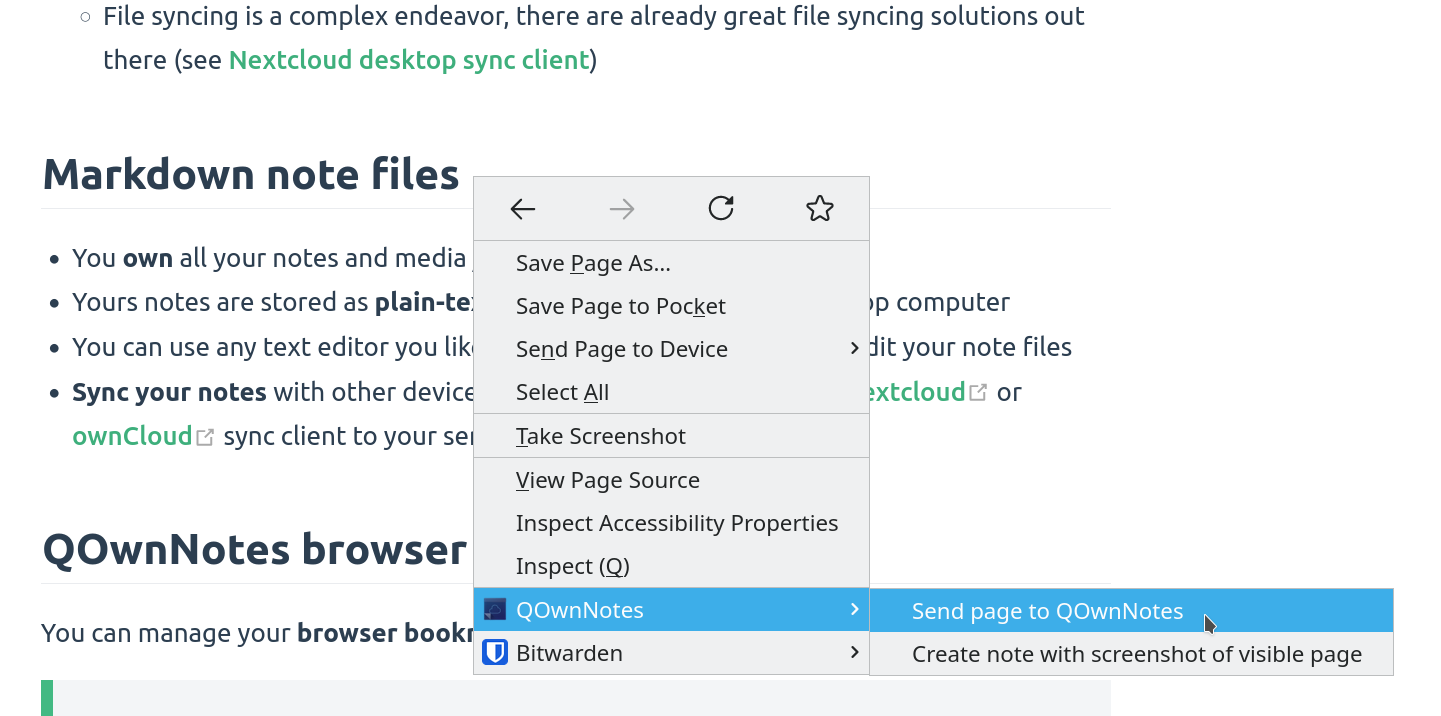
web-clipper

Kattintson a jobb gombbal egy weboldalra vagy a kiválasztott szövegre a ** web-clipper** funkció használatához. Itt új jegyzetet is létrehozhat az aktuális weboldal képernyőkép jével.

Figyelem

Info If the web clipper doesn't work, please check if the QOwnNotes desktop application is running, and the Web Companion browser extension is configured with the security token.

Also, make sure you accept the consent dialog when you first click the extension icon in the browser toolbar.

If you are using Firefox, you also need to make sure that you have turned on the optional permission Access your data for all websites in the Permission extension settings, otherwise you might get an error TypeError: chrome.tabs.captureVisibleTab is not a function.

Tipp

A webleíró is szkriptelhető! Vessen egy pillantást a websocketRawDataHook oldalra, ha szeretné szabályozni, hogy mit is klipel a weboldalakról.

Könyvjelzők
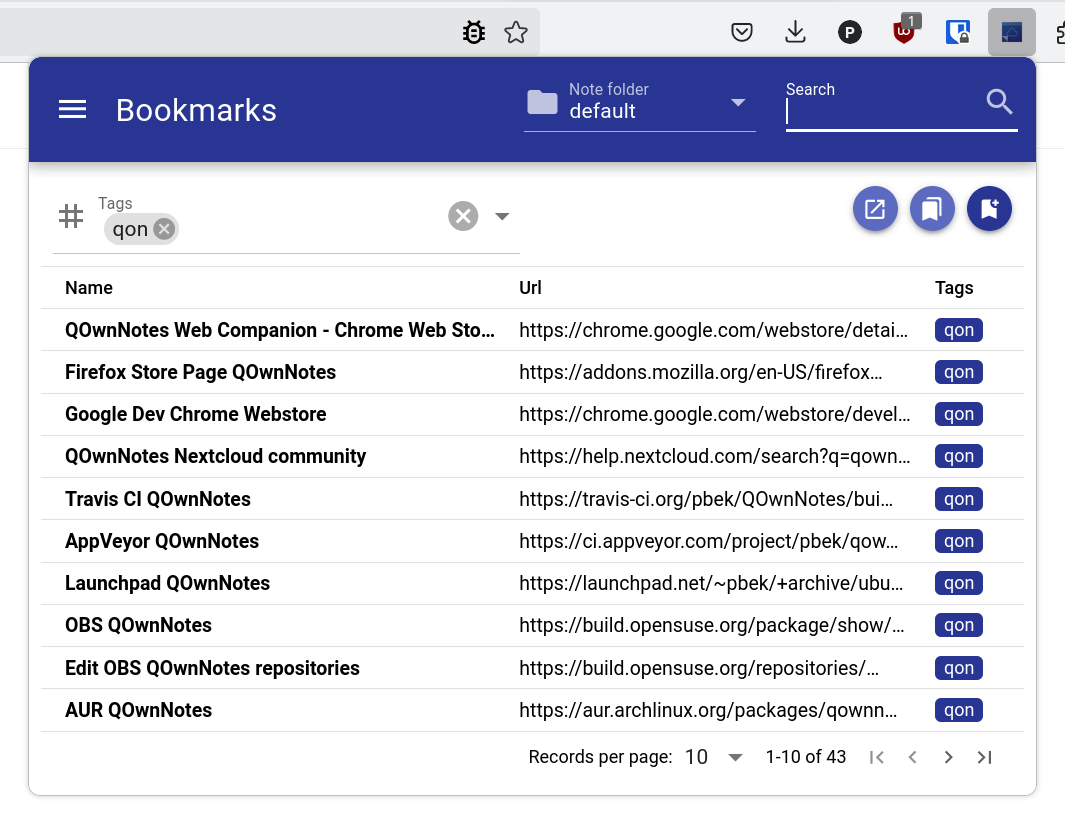
bookmarks

Ha teljes irányítást szeretne a böngésző könyvjelzői felett, és különböző böngészőkben és operációs rendszerekben használni szeretné őket, akkor a QOwnNotes böngészőbővítmény az Ön számára készült.

By default, the browser extension will show all links of the current note in a popup when you click the QOwnNotes icon in your browser. Ezek a linkek egy current címkét kapnak.

A ** könyvjelzőket jegyzetekben is kezelheti** a bookmarks (a beállításokban módosítható) jegyzetcímkével. Ezek a linkek címkékkel és leírással is rendelkezhetnek, amelyek a böngésző kiterjesztésében jelennek meg.

Az új könyvjelzőket a Könyvjelzők nevű jegyzet tárolja (a beállításokban is változtatható).

Tipp

A böngésző könyvjelzőit a webkísérő böngésző kiterjesztéssel is importálhatja a QOwnNotes programba!

A könyvjelző linkek szintaxisa

- [Webpage name](https://www.example.com)
- [Webpage name](https://www.example.com) #tag1 #tag2
- [Webpage name](https://www.example.com) some description only
- [Webpage name](https://www.example.com) #tag1 #tag2 some description and tags

* [Webpage name](https://www.example.com) the alternative list character also works

You are able to search for name, url tags or description in the browser extension. In the current note all other links inside of text are parsed, but without tags or description.

Help us improve this page!
Prev
Parancssori interfész paraméterek
Next
Command-line Snippet Manager