
QOwnNotesQOwnNotes
Getting started
Installation
  • Ask question
  • Ask for feature
  • Report bug
  • Telegram Channel
  • Matrix/Element.io Room
  • Gitter Chat
  • IRC Channel
  • Mastodon
  • Twitter
  • Facebook
Donate
  • English
  • Deutsch
  • Italiano
  • Français
  • Español
  • فارسی
  • Nederlands
  • Magyar
  • العربية
  • Polski
  • 한국어
GitHub
Getting started
Installation
  • Ask question
  • Ask for feature
  • Report bug
  • Telegram Channel
  • Matrix/Element.io Room
  • Gitter Chat
  • IRC Channel
  • Mastodon
  • Twitter
  • Facebook
Donate
  • English
  • Deutsch
  • Italiano
  • Français
  • Español
  • فارسی
  • Nederlands
  • Magyar
  • العربية
  • Polski
  • 한국어
GitHub
  • Getting started

    • Overview
    • Concept
    • QOwnNotes Demo
    • Markdown
    • Importing notes
    • Command line interface parameters
    • QOwnNotes Web Companion browser extension
    • Command-line Snippet Manager
    • QOwnNotes Web App
    • QOwnNotesAPI Nextcloud App
    • Note relations panel
    • Searching for notes
    • Shortcuts
    • Git versioning
  • Installation

    • Installation
    • Install on Ubuntu Linux, elementary OS and Linux Mint
    • Install on Microsoft Windows™
    • Install on macOS™
    • Install on Debian Linux
    • Install on openSUSE Linux
    • Install on Fedora Linux
    • Install as Snap
    • Install as Flatpak
    • Install as AppImage
    • Install via Nix
    • Install on Arch Linux
    • Install on Solus
    • Install on KaOS Linux
    • Install on CentOS Linux
    • Install on Raspberry Pi OS
    • Install on Gentoo Linux
    • Install on Funtoo Linux
    • Install on Void Linux
    • Install on Slackware Linux
    • Install on FreeBSD
    • Building QOwnNotes
  • Editor

    • Spellchecking
    • AI support
    • Time formats
  • Scripting

    • QOwnNotes Scripting
    • Methods and objects QOwnNotes provides
    • Hooks
    • Exposed classes
  • Contributing

    • Getting involved
    • Code of Conduct
    • Maintainers
    • Translation
    • Donate
    • Sponsors
  • FAQ

    • How can I just show the preview panel without the note edit panel?
    • Where can I find what other people said about QOwnNotes?
    • Why metrics?
  • Blog

    • Overview
    • Universal binary for macOS
    • Note relations panel
    • AI support was added to QOwnNotes
    • Source Archive switched from TuxFamily to GitHub Releases
    • Nextcloud Deck integration in QOwnNotes
    • QOwnNotes UI End2End Tests with the help of NixOS
    • Please test Qt6 version of QOwnNotes from a new PPA for Ubuntu Linux
    • Evernote import for huge files
    • Happy 1000th release of QOwnNotes
    • Polish website translation
    • Working with multiple notes
    • QOwnNotes command-line snippet manager
    • Nextcloud note versions
    • Manage orphaned image files and attachments
    • Linking of note headings
    • Tor Hidden Service Webpage
    • Use workspaces to manage different layouts of the user interface
    • Auto-complete text in note editor
    • Open links in the note editor
    • Solve simple equations in the note editor
    • Auto-format Markdown tables
    • QOwnNotes Mastodon page
    • Repository for Debian 11
    • Joplin import
    • Send photos from your mobile phone to QOwnNotes on the desktop
    • Four new languages added to the website
    • QOwnNotes Demo
    • Markdown explanation
    • Webpage translation
    • QOwnNotes for Ubuntu 21.04 Hirsute Hippo
    • QOwnNotes for Fedora 33
    • Release and blog posting automation
    • Legacy update service up again
    • RSS Feeds are back in place
    • Time Flies Podcast episode with interview about QOwnNotes
    • Bookmark management with QOwnNotes and Web Companion browser extension
    • Firefox extension on Firefox Add-ons page
    • Chrome extension in Chrome Web Store
    • QOwnNotes Web Companion Chrome extension
    • 500th release of QOwnNotes
    • QOwnNotes Telegram Group
    • Vim mode
    • QOwnNotes for openSUSE Leap 15, SUSE Linux Enterprise 15 and SUSE Linux Enterprise 12 SP3
    • QOwnNotes featured on LINUX Unplugged podcast and by Ubuntu
    • Interview for ownCloud
    • QOwnNotes for Fedora 27
    • QOwnNotes reviewed in German magazine c't
    • QOwnNotesAPI in the ownCloud Marketplace
    • QOwnNotes as AppImage
    • QOwnNotes for Debian 9.0, Fedora 26 and openSUSE Leap 42.3
    • Script repository and script settings variables
    • Fedora 25 release and new documentation page
    • Solus package for QOwnNotes
    • Automatic updates in Windows and macOS
    • Note encryption with keybase.io or directly with PGP
    • Evernote import
    • Portable mode
    • QOwnNotes on webupd8.org
    • QOwnNotes featured on the Linux Voice Podcast
    • QOwnNotes snap
    • QOwnNotes review in British magazine Linux Format
    • QOwnNotes Slackware Linux Repository
    • QOwnNotes review
    • QOwnNotes IRC
    • QOwnNotes now has scripting support
    • QOwnNotes is the Desktop App Pick on the Linux Action Show
    • QOwnNotes got featured in Linux Voice 25
    • QOwnNotes Gentoo Linux Overlay
    • Translate QOwnNotes on Crowdin
    • QOwnNotes 1.0 out now in 6 languages and with Freedesktop theme icons support
    • QOwnNotes software repository for Debian Linux
    • QOwnNotes package on the Arch User Repository
    • QOwnNotes software repository for Arch Linux
    • Webpage redesign
    • Qt widget QMarkdownTextEdit now a separate project for developer's pleasure
    • New release version RSS feed
    • New Linux software repositories and todo list support
    • QOwnNotes on Linux Unplugged
    • Build and release systems for QOwnNotes for Linux, macOS and Windows!
    • Links to other notes or files are now possible in QOwnNotes
  • Changelog

    • QOwnNotes Changelog

QOwnNotes Web Companion browser extension

Allows for clipping from a browser page and managing browser bookmarks across browsers and operating systems.

Info

  • QOwnNotes must be running for the Web Companion browser extension to work.
  • No internet connection needed. The browser extensions works offline. :::

Installation

  1. Get the extension
    • Chrome Web Store
    • Firefox Add-ons page
    • You can also find the extension on GitHub.
  2. Add the Security Token to configure the extension.
    • The first time you click on the QOwnNotes browser extension icon you will receive a dialog box with a security token. Copy the token.
    • Go to your browser's extension management location. Click into the QOwnNotes extension details.
    • Paste the token into the Security Token field.
  3. To use the private mode, you need to allow the extension to run in private windows in the extension settings.

Web clipper
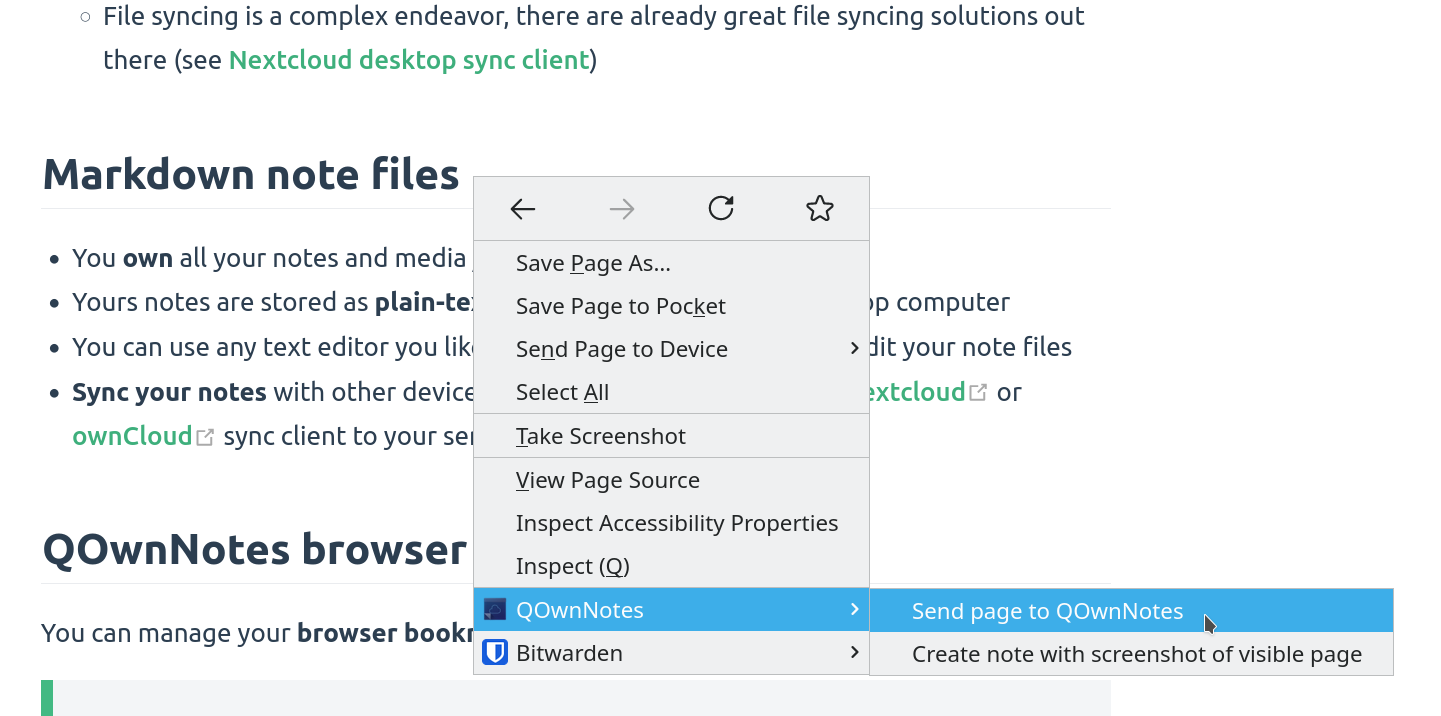
web-clipper

Right-click on a webpage or selected text to use the web-clipper functionality. There you can also create a new note with a screenshot of the current webpage.

Info

If the web clipper doesn't work, please check if the QOwnNotes desktop application is running, and the Web Companion browser extension is configured with the security token.

Also, make sure you accept the consent dialog when you first click the extension icon in the browser toolbar.

If you are using Firefox, you also need to make sure that you have turned on the optional permission Access your data for all websites in the Permission extension settings, otherwise you might get an error TypeError: chrome.tabs.captureVisibleTab is not a function.

Tips

The web clipper is also scriptable! Take a look at the websocketRawDataHook if you want to control what you clip from webpages.

Bookmarks
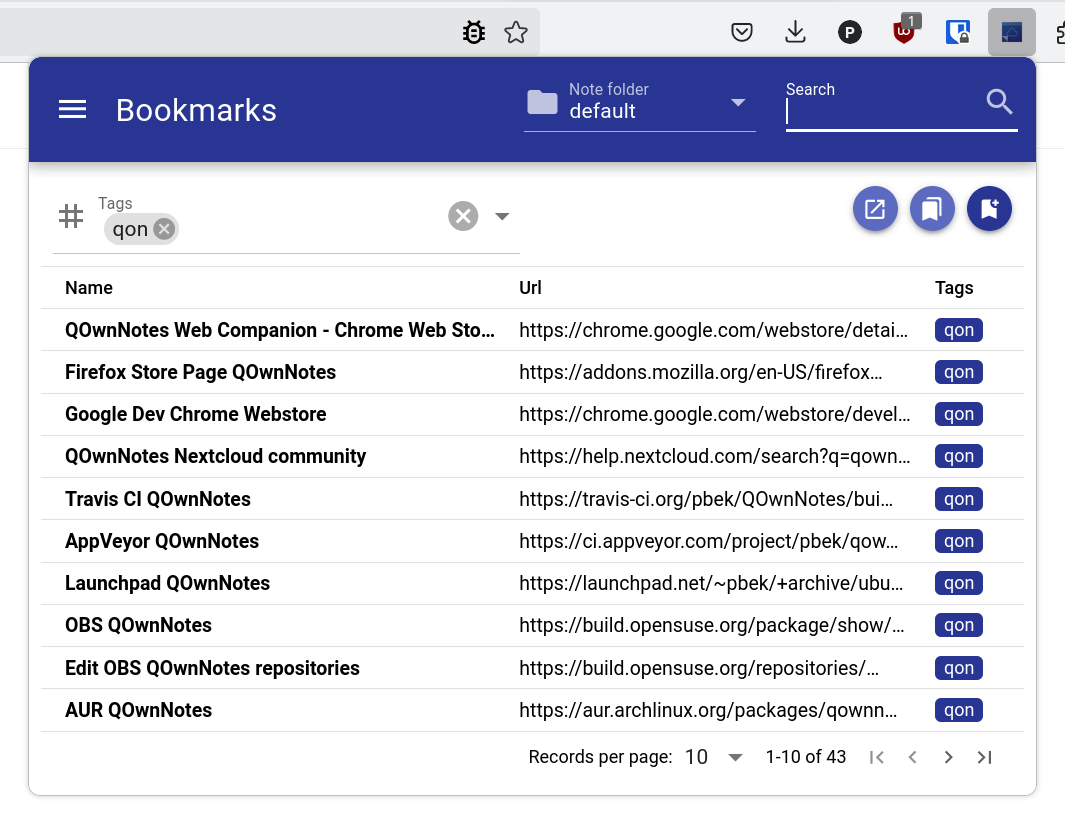
bookmarks

If you want full control over your browser bookmarks and use them across different browsers and operating systems then the QOwnNotes browser extension is for you.

By default, the browser extension will show all links of the current note in a popup when you click the QOwnNotes icon in your browser. These links will get a tag current.

You can also manage your bookmarks in notes with the note tag bookmarks (changeable in the settings). These links can also have tags and a description that will be shown in the browser extension.

New bookmarks are stored in a note called Bookmarks (also changeable in the settings).

Tips

You can also import your browser bookmarks into QOwnNotes with the web companion browser extension!

Syntax of bookmark links

- [Webpage name](https://www.example.com)
- [Webpage name](https://www.example.com) #tag1 #tag2
- [Webpage name](https://www.example.com) some description only
- [Webpage name](https://www.example.com) #tag1 #tag2 some description and tags

* [Webpage name](https://www.example.com) the alternative list character also works

You are able to search for name, url tags or description in the browser extension. In the current note all other links inside of text are parsed, but without tags or description.

Help us improve this page!
Prev
Command line interface parameters
Next
Command-line Snippet Manager