
QOwnNotesQOwnNotes
Aan de slag
Installatie
  • Ask question
  • Ask for feature
  • Report bug
  • Telegram Channel
  • Matrix/Element.io Room
  • Gitter Chat
  • IRC Channel
  • Mastodon
  • Twitter
  • Facebook
Doneren
  • English
  • Deutsch
  • Italiano
  • Français
  • Español
  • فارسی
  • Nederlands
  • Magyar
  • العربية
  • Polski
  • 한국어
GitHub
Aan de slag
Installatie
  • Ask question
  • Ask for feature
  • Report bug
  • Telegram Channel
  • Matrix/Element.io Room
  • Gitter Chat
  • IRC Channel
  • Mastodon
  • Twitter
  • Facebook
Doneren
  • English
  • Deutsch
  • Italiano
  • Français
  • Español
  • فارسی
  • Nederlands
  • Magyar
  • العربية
  • Polski
  • 한국어
GitHub
  • Aan de slag

    • Overzicht
    • Concept
    • QOwnNotes Demo
    • Markdown
    • Notities importeren
    • Opdrachtregel-interface-parameters
    • Browser-extensie QOwnNotes Web Companion
    • Command-line Snippet Manager
    • QOwnNotes-webapp
    • QOwnNotesAPI Nextcloud App
    • Paneel Notitierelaties
    • Zoeken naar notities
    • Sneltoetsen
    • Git versiebeheer
  • Installatie

    • Installatie
    • Installatie op Ubuntu Linux, elementary OS en Linux Mint
    • Installatie op Microsoft Windows™
    • Installatie op macOS™
    • Installatie op Debian Linux
    • Installatie op openSUSE Linux
    • Installatie op Fedora Linux
    • Installatie als Snap
    • Installatie als Flatpak
    • Installeer als AppImage
    • Installatie via Nix
    • Installatie op Arch Linux
    • Installatie op Solus
    • Installatie op KaOS Linux
    • Installatie op CentOS Linux
    • Installatie op Raspberry Pi OS
    • Installatie op Gentoo Linux
    • Installatie op Funtoo Linux
    • Installatie on Void Linux
    • Installatie op Slackware Linux
    • Installatie op FreeBSD
    • QOwnNotes bouwen
  • Editor

    • Spellingcontrole
    • AI-ondersteuning
    • Tijdnotatie
  • Scripting

    • QOwnNotes-scripts
    • Methoden en objecten die QOwnNotes biedt
    • Hooks
    • Blootgestelde klassen
  • Bijdragen

    • Actief worden
    • Gedragscode
    • Onderhouders
    • Vertaling
    • Doneren
    • Sponsors
  • FAQ

    • Hoe kan ik gewoon het voorbeeldvenster weergeven zonder het notitiebewerkingspaneel?
    • Waar kan ik vinden wat andere mensen zeggen over QOwnNotes?
    • Waarom statistieken?
  • Blog (in het Engels)

    • /nl/blog/
    • /nl/blog/2025-07-22-Universal-binary-for-macOS.html
    • /nl/blog/2025-03-14-Note-relations-panel.html
    • /nl/blog/2024-05-17-AI-support-was-added-to-QOwnNotes.html
    • /nl/blog/2023-07-12-Source-Archive-switched-from-TuxFamily-to-GitHub-Releases.html
    • /nl/blog/2023-06-17-Nextcloud-Deck-integration-in-QOwnNotes.html
    • /nl/blog/2023-06-17-QOwnNotes-UI-End2End-Tests-with-the-help-of-NixOS.html
    • /nl/blog/2023-02-03-Test-Qt6-version-of-QOwnNotes-from-a-new-PPA-for-Ubuntu-Linux.html
    • /nl/blog/2023-01-29-Evernote-import-for-huge-files.html
    • /nl/blog/2022-12-06-Happy-1000th-release-of-QOwnNotes.html
    • /nl/blog/2022-10-15-Polish-website-translation.html
    • /nl/blog/2022-07-28-Working-with-multiple-notes.html
    • /nl/blog/2021-11-23-QOwnNotes-command-line-snippet-manager.html
    • /nl/blog/2021-11-15-Nextcloud-note-versions.html
    • /nl/blog/2021-11-11-Manage-orphaned-image-files-and-attachments.html
    • /nl/blog/2021-10-25-Linking-of-note-headings.html
    • /nl/blog/2021-08-31-Tor-Hidden-Service-Webpage.html
    • /nl/blog/2021-08-25-Use-workspaces-to-manage-different-kayouts-of-the-user-interface.html
    • /nl/blog/2021-08-25-Auto-complete-in-note-editor.html
    • /nl/blog/2021-08-22-Open-links-in-the-note-editor.html
    • /nl/blog/2021-08-21-Solve-simple-equations-in-the-note-editor.html
    • /nl/blog/2021-08-21-Auto-format-markdown-tables.html
    • /nl/blog/2021-08-20-QOwnNotes-Mastodon-page.html
    • /nl/blog/2021-08-20-Repository-for-Debian-11.html
    • /nl/blog/2021-07-18-Joplin-import.html
    • /nl/blog/2021-05-02-Send-photos-from-your-mobile-phone-to-QOwnNotes-on-the-desktop.html
    • /nl/blog/2021-01-28-Four-new-languages-added-to-the-website.html
    • /nl/blog/2021-01-16-QOwnNotes-Demo.html
    • /nl/blog/2020-11-10-Markdown-explanation.html
    • /nl/blog/2020-11-10-Webpage-translation.html
    • /nl/blog/2020-11-08-QOwnNotes-for-Ubuntu-21.04-Hirsute-Hippo.html
    • /nl/blog/2020-10-27-QOwnNotes-for-Fedora-33.html
    • /nl/blog/2020-10-26-Release-and-blog-posting-automation.html
    • /nl/blog/2020-10-26-Legacy-update-service-up-again.html
    • /nl/blog/2020-10-23-RSS-Feeds-are-back-in-place.html
    • /nl/blog/2019-08-12-Time-Flies-Podcast-episode-with-interview-about-QOwnNotes.html
    • /nl/blog/2019-01-16-Bookmark-management-with-QOwnNotes-and-Web-Companion-browser-extension.html
    • /nl/blog/2019-01-09-Firefox-extension-on-Firefox-Add-ons-page.html
    • /nl/blog/2018-12-31-Chrome-extension-in-Chrome-Web-Store.html
    • /nl/blog/2018-12-27-QOwnNotes-Web-Companion-Chrome-extension.html
    • /nl/blog/2018-12-23-500th-release-of-QOwnNotes.html
    • /nl/blog/2018-10-05-QOwnNotes-Telegram-Group.html
    • /nl/blog/2018-08-07-Vim-mode.html
    • /nl/blog/2018-03-29-QOwnNotes-for-openSUSE-Leap-15-SUSE-Linux-Enterprise-15-and-SUSE-Linux-Enterprise-12-SP3.html
    • /nl/blog/2018-01-11-QOwnNotes-featured-on-LINUX-Unplugged-podcast-and-by-Ubuntu.html
    • /nl/blog/2017-12-12-Interview-for-ownCloud.html
    • /nl/blog/2017-11-24-QOwnNotes-for-Fedora-27.html
    • /nl/blog/2017-10-01-QOwnNotes-reviewed-in-German-magazine-c't.html
    • /nl/blog/2017-07-05-QOwnNotesAPI-in-the-ownCloud-Marketplace.html
    • /nl/blog/2017-07-03-QOwnNotes-as-AppImage.html
    • /nl/blog/2017-06-26-QOwnNotes-for-Debian-9.0-Fedora-26-and-openSUSE-Leap-42.3.html
    • /nl/blog/2017-05-19-Script-repository-and-script-settings-variables.html
    • /nl/blog/2016-12-20-Fedora-25-release-and-new-documentation-page.html
    • /nl/blog/2016-11-23-Solus-package-for-QOwnNotes.html
    • /nl/blog/2016-11-05-Automatic-updates-in-Windows-and-macOS.html
    • /nl/blog/2016-10-02-Note-encryption-with-keybase.io-or-directly-with-PGP.html
    • /nl/blog/2016-09-24-Evernote-import.html
    • /nl/blog/2016-09-18-Portable-mode.html
    • /nl/blog/2016-09-05-QOwnNotes-on-webupd8.org.html
    • /nl/blog/2016-07-12-QOwnNotes-featured-on-the-Linux-Voice-Podcast.html
    • /nl/blog/2016-07-12-QOwnNotes-snap.html
    • /nl/blog/2016-07-11-QOwnNotes-review-in-British-magazine-Linux-Format.html
    • /nl/blog/2016-06-27-QOwnNotes-Slackware-Linux-Repository.html
    • /nl/blog/2016-06-22-QOwnNotes-review.html
    • /nl/blog/2016-05-25-QOwnNotes-IRC.html
    • /nl/blog/2016-05-13-QOwnNotes-now-has-scripting-support.html
    • /nl/blog/2016-03-28-QOwnNotes-is-the-Desktop-App-Pick-on-the-Linux-Action-Show.html
    • /nl/blog/2016-03-25-QOwnNotes-got-featured-in-Linux-Voice-25.html
    • /nl/blog/2016-03-01-QOwnNotes-Gentoo-Linux-Overlay.html
    • /nl/blog/2016-02-26-Translate-QOwnNotes-on-Crowdin.html
    • /nl/blog/2016-02-14-QOwnNotes-1.0-out-now-in-6-languages-and-with-Freedesktop-theme-icons-support.html
    • /nl/blog/2016-01-31-QOwnNotes-software-repository-for-Debian-Linux.html
    • /nl/blog/2016-01-30-QOwnNotes-package-on-the-Arch-User-Repository.html
    • /nl/blog/2016-01-27-QOwnNotes-software-repository-for-Arch-Linux.html
    • /nl/blog/2016-01-26-Webpage-redesign.html
    • /nl/blog/2016-01-13-Qt-widget-QMarkdownTextEdit-now-a-separate-project-for-developer's-pleasure.html
    • /nl/blog/2016-01-09-New-release-version-RSS-feed.html
    • /nl/blog/2016-01-07-New-Linux-software-repositories-and-todo-list-support.html
    • /nl/blog/2015-11-04-QOwnNotes-on-Linux-Unplugged.html
    • /nl/blog/2015-07-27-Build-and-release-systems-for-QOwnNotes-for-Linux-Mac-OS-X-and-Windows.html
    • /nl/blog/2015-03-23-Links-to-other-notes-or-files-are-now-possible-in-QOwnNotes.html
  • Changelog (in het Engels)

    • QOwnNotes Changelog

Command-line Snippet Manager

U kunt de QOwnNotes Command-line Snippet Manager gebruiken om opdrachtfragmenten uit te voeren die zijn opgeslagen in notities in QOwnNotes vanaf de opdrachtregel.
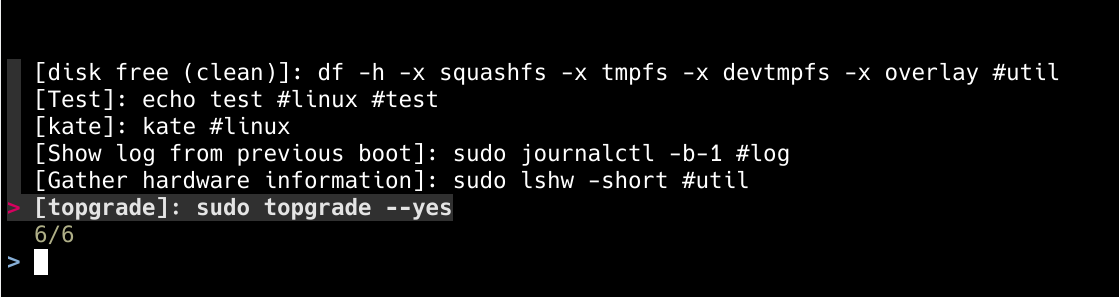
qc

U kunt notities met een speciale tag gebruiken om command snippets op te slaan, die u uit kunt voeren vanuit de command-line snippet manager.
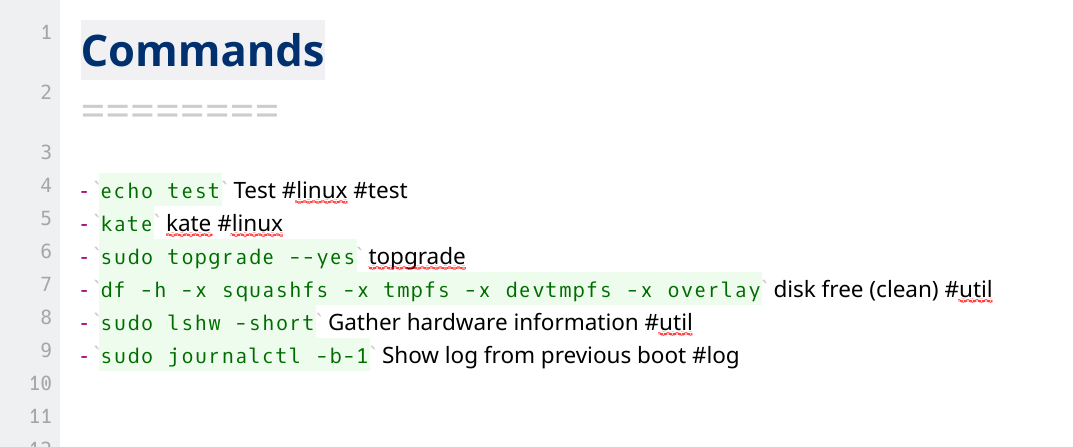
commands

Installatie

Ga naar de nieuwste release-pagina en download de versie die je nodig hebt.

Tips

Als je jq hebt geïnstalleerd, kun je dit fragment ook gebruiken om bijvoorbeeld de nieuwste Linux AMD64 AppImage te downloaden en te installeren naar /usr/local/bin/qc:

curl https://api.github.com/repos/qownnotes/qc/releases/latest | \
jq '.assets[] | select(.browser_download_url | endswith("_linux_amd64.tar.gz")) | .browser_download_url' | \
xargs curl -Lo /tmp/qc.tar.gz && \
tar xfz /tmp/qc.tar.gz -C /tmp && \
rm /tmp/qc.tar.gz && \
sudo mv /tmp/qc /usr/local/bin/qc && \
/usr/local/bin/qc --version

Afhankelijkheden

fzf (fuzzy zoeken) of peco (ouder, maar waarschijnlijker standaard geïnstalleerd) moeten worden geïnstalleerd om naar opdrachten op de opdrachtregel te zoeken.

Tips

Standaard wordt fzf gebruikt om te zoeken, maar u kunt peco gebruiken door dit in te stellen met qc configure.

Opstelling
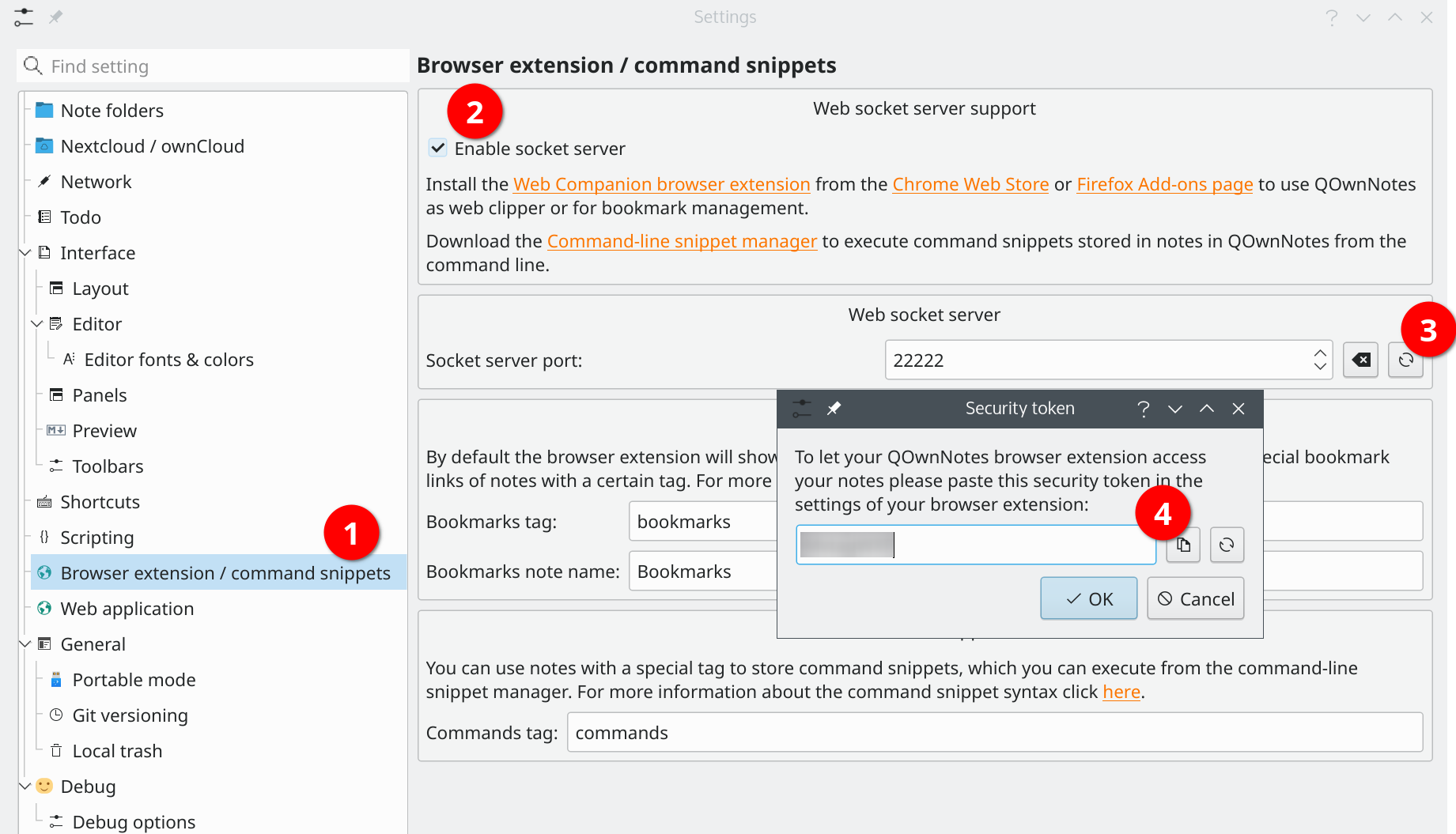
socket-server-token

Before you are using the snippet manager you need to enable the Web socket server (2) in the Browser extension / command snippets (1) settings in QOwnNotes.

Dan moet je het security token (3) laten zien en kopiëren (4).

Open nu het configuratiebestand van de snippetmanager met:

# Configureer de snippetmanager
qc configureren

En plaats het security token in het token attribuut:

[QOwnNotes]
token = "yourtokenhere"

Tips

In de QOwnNotes-instellingen kunt u ook instellen welke notitietag moet worden gebruikt om naar opdrachten in notities te zoeken. Standaard wordt de tag opdrachten gebruikt.

Syntaxis van opdrachtfragmenten

U kunt ongeordende lijsten met in-line codeblokken gebruiken om opdrachtfragmenten op te slaan. Alle notities met de tag opdrachten worden doorzocht op opdrachtfragmenten.

Als je een cmd: toevoegt voor het in-line codeblok, zal het commando ook gevonden worden in de huidige notitie ongeacht notitietags.

- `echo I am a command` I am a description #tag1 #tag2 #tag3

* `echo I am also a command` I am a description #tag3 #tag4 #tag5

- cmd: `echo I will be found in the current note` This command will be found in the current note regardless of note tags

<!-- Example for asking for user input -->

- `read -p "PR ID: " id && git fetch origin pull/$id/head:pull-$id && git checkout pull-$id` Ask for pull request ID and checkout pull request

bash of shell codeblokken, voorafgegaan door een kop 2 of hoger als beschrijving, kunnen ook worden gebruikt voor opdrachtfragmenten. Tags worden ook ondersteund als ze tussen de kop en het codeblok staan.

## Doe dit met een "bash" codeblok

- deze tekst wordt genegeerd tekst
- maar tags kunnen worden gebruikt: #tag1 #tag2

```bash
echo doe dit
 echo doe dat
```


## Mach etwas anderes mit einem "sh" Codeblock

```sh
echo doe iets anders
 echo doe iets anders
```

Bovenstaand voorbeeld resulteert in twee opdrachtfragmenten, de eerste met de twee tags tag1 en tag2.

Gebruik

# Zoek en voer opdrachtfragmenten uit
qc exec
# Parancsrészletek keresése és nyomtatása
qc keresés

Configuratie

Run qc configure.

[General]
  editor = "vim"            # je favoriete teksteditor
  column = 40               # kolomgrootte voor lijstopdracht
  selectcmd = "fzf"         # selector commando voor edit commando (fzf of peco)
  sortby = ""               # specificeer hoe fragmenten worden gesorteerd (recentheid (standaard), -recentie, beschrijving, -beschrijving, opdracht, -commando, uitvoer, -uitvoer)

[QOwnNotes]
  token = "MvTagHXF"        # your QOwnNotes API token
  websocket_port = 22222    # websocket port in QOwnNotes

Shell voltooiing

U kunt shell-aanvullingscode voor uw shell genereren met qc voltooiing <shell>.

Voor de Fish shell kun je bijvoorbeeld gebruiken:

qc completion fish > ~/.config/fish/completions/qc.fish
Help us improve this page!
Prev
Browser-extensie QOwnNotes Web Companion
Next
QOwnNotes-webapp