
AI-ondersteuning
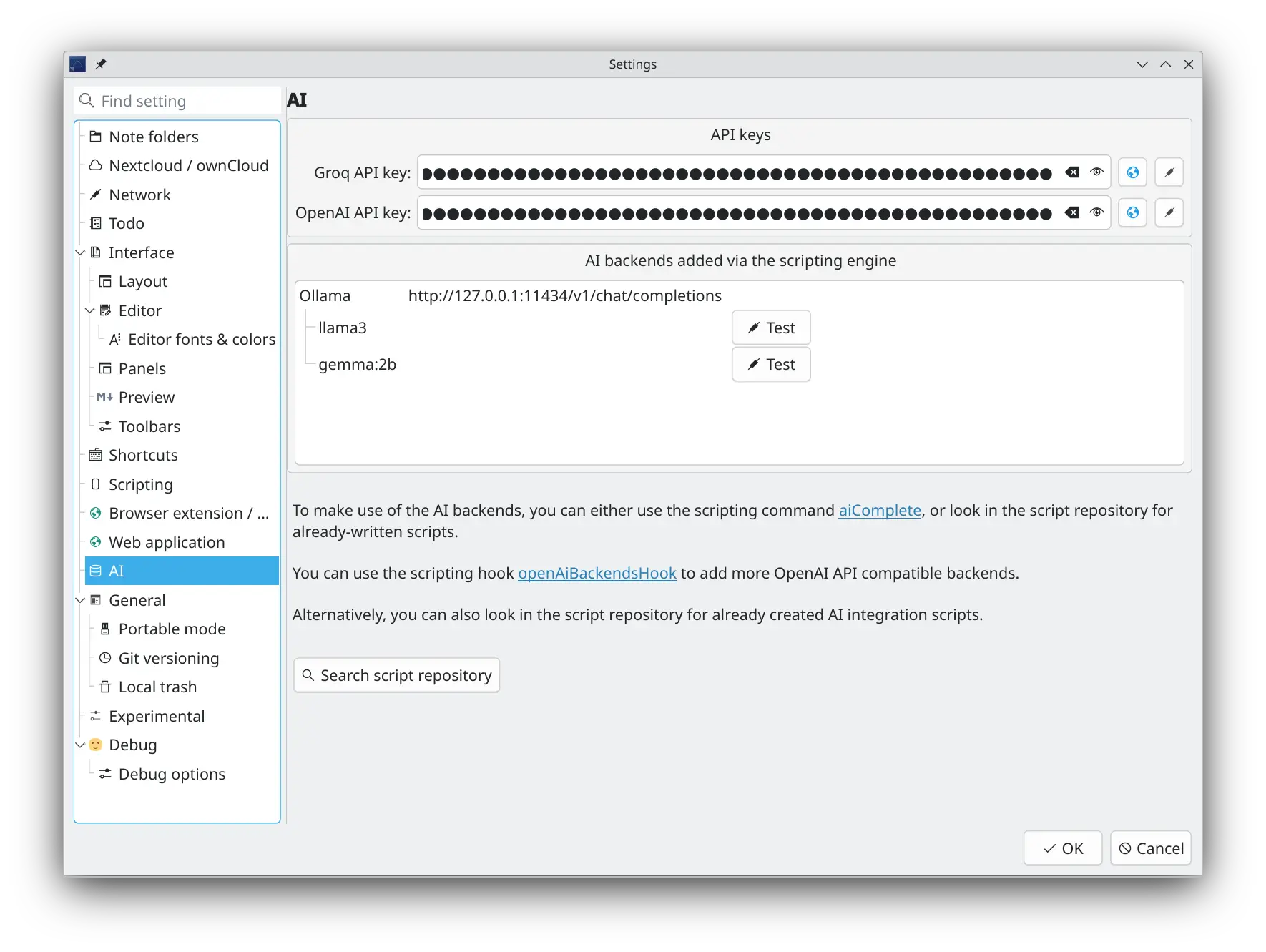
Je kunt ervoor kiezen om je favoriete AI-model (LLM) te gebruiken om je te helpen met je notities. Er is ingebouwde ondersteuning voor Groq (omdat je gratis API-sleutels kunt krijgen) en OpenAI, maar de interne API is ontworpen om gemakkelijk uit te breiden naar andere AI-modellen met scripts. Er zijn verschillende scripts voor AI-backend-integraties beschikbaar in de script-opslagplaats om je op weg te helpen.
Tips
De OpenAI-voltooiings-API is geïmplementeerd om te worden gebruikt in scripts. Zo kun je doen wat je wilt en ermee experimenteren.
- Er is een AI-werkbalk en een sectie in het Hoofdmenu bewerken, waar je de service aan kunt zetten, en de AI-backend en het AI-model selecteren
- Je kunt een OpenAI en Groq API-sleutel toevoegen in de nieuwe AI-instellingen
- Look for more AI backend integrations, like Ollama and llama.cpp in the script repository
- Gebruik het nieuwe scriptcommando 'script.aiComplete(prompt)' naar je eigen idee
- Voor meer informatie kun je de [Documentatie voor scripts](.. /scripting/methods-and-objects.md#use-a-completion-prompt-on-the-currently-selected-ai-model) bestuderen
- In de script-opslagplaats is er om te beginnen een script AI-automatische voltooiing, die het geselecteerde AI-model gebruikt om de huidige selectie automatisch aan te vullen in de tekstbewerking van de notitie, en een script AI Text Tool, die het geselecteerde AI-model gebruikt om de huidige selectie te verwerken in de tekstbewerking van de notitie, bijvoorbeeld om het samen te vatten, te vertalen of om typefouten en grammaticale fouten te herstellen
MCP Server
QOwnNotes includes a built-in MCP (Model Context Protocol) server that allows external AI agents to access your notes over HTTP with Server-Sent Events (SSE) transport.
You can enable and configure the MCP server in the AI / MCP server settings page.
- Enable/disable the MCP server
- Configure the port (default: 22226)
- Bearer token authentication — a security token is auto-generated and must be included as a
Bearertoken in theAuthorizationheader of all requests
Available MCP Tools
The MCP server exposes the following tools to AI agents:
search_notes— Full-text search across all notes in the current note folder. Accepts aquerystring parameter and an optionallimit(default 20). Returns matching note names and a short preview of each.fetch_note— Retrieve the full content of a single note bynameorid. Returns the note text, file name, and note ID.
Connecting an AI Agent
AI agents connect to the MCP server using the HTTP+SSE transport:
- SSE endpoint:
GET http://localhost:22226/sse
Opens a Server-Sent Events stream. The server sends anendpointevent containing the URL for sending JSON-RPC messages. - Message endpoint:
POST http://localhost:22226/message?sessionId=<id>
Send MCP JSON-RPC requests here. The response is delivered over the SSE stream.
All requests must include the header:
Authorization: Bearer <your-security-token>
Example curl Requests
Set the token and port first:
export TOKEN="your-mcp-token"
export PORT=22226
Open the SSE stream in one terminal:
curl -N \
  -H "Accept: text/event-stream" \
  -H "Authorization: Bearer $TOKEN" \
  "http://localhost:$PORT/sse"
The server will send an endpoint event containing a URL like:
event: endpoint
data: http://localhost:22226/message?sessionId=3d8c7b0e-...
Use the sessionId from that event in the following requests. The POST request itself returns 202 Accepted; the JSON-RPC response is delivered over the SSE stream.
Initialize the MCP session:
curl \
  -X POST \
  -H "Content-Type: application/json" \
  -H "Authorization: Bearer $TOKEN" \
  --data '{
    "jsonrpc": "2.0",
    "id": 1,
    "method": "initialize",
    "params": {}
  }' \
  "http://localhost:$PORT/message?sessionId=3d8c7b0e-..."
List the available MCP tools:
curl \
  -X POST \
  -H "Content-Type: application/json" \
  -H "Authorization: Bearer $TOKEN" \
  --data '{
    "jsonrpc": "2.0",
    "id": 2,
    "method": "tools/list",
    "params": {}
  }' \
  "http://localhost:$PORT/message?sessionId=3d8c7b0e-..."
Search notes:
curl \
  -X POST \
  -H "Content-Type: application/json" \
  -H "Authorization: Bearer $TOKEN" \
  --data '{
    "jsonrpc": "2.0",
    "id": 3,
    "method": "tools/call",
    "params": {
      "name": "search_notes",
      "arguments": {
        "query": "meeting notes",
        "limit": 5
      }
    }
  }' \
  "http://localhost:$PORT/message?sessionId=3d8c7b0e-..."
Fetch a note by name:
curl \
  -X POST \
  -H "Content-Type: application/json" \
  -H "Authorization: Bearer $TOKEN" \
  --data '{
    "jsonrpc": "2.0",
    "id": 4,
    "method": "tools/call",
    "params": {
      "name": "fetch_note",
      "arguments": {
        "name": "Daily Journal"
      }
    }
  }' \
  "http://localhost:$PORT/message?sessionId=3d8c7b0e-..."
Fetch a note by ID:
curl \
  -X POST \
  -H "Content-Type: application/json" \
  -H "Authorization: Bearer $TOKEN" \
  --data '{
    "jsonrpc": "2.0",
    "id": 5,
    "method": "tools/call",
    "params": {
      "name": "fetch_note",
      "arguments": {
        "id": 123
      }
    }
  }' \
  "http://localhost:$PORT/message?sessionId=3d8c7b0e-..."