
노트 검색
노트를 검색하거나 노트 내부의 텍스트를 검색하려면 바로 가기 Ctrl + ⇧ Shift + F (또는 macOS에서 ⌘ Cmd + ⇧ Shift + F)를 사용하여 _노트 검색 패널_로 이동할 수 있습니다.
노트를 검색하는 방법은 여러 가지가 있습니다:
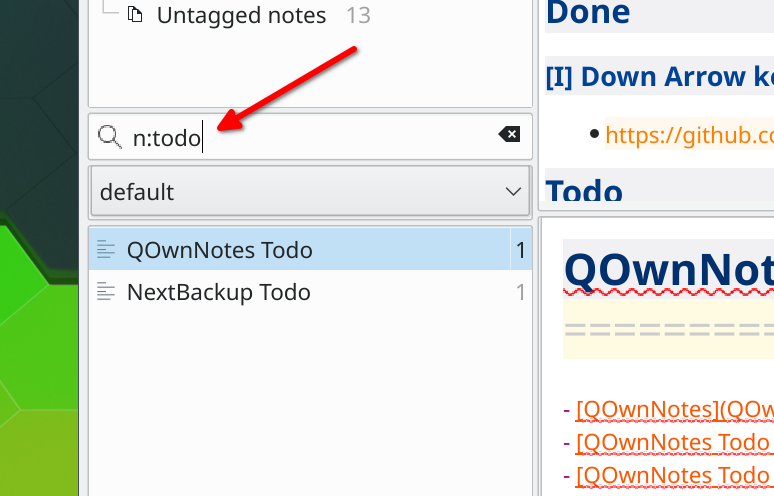
note book은 파일 이름 또는 노트 텍스트에서note과book을 모두 포함하는 노트를 검색합니다"노트북"은 파일 이름 또는 노트 텍스트에서 텍스트 노트와 정확히 일치하는노트북을 검색합니다n:북또는이름:북은 노트 이름 또는 파일 이름에북이 있는 노트를 검색합니다n:"note book"orname:"note book"will search for notes with exactlynote bookjust in the note name or file namew:note또는word:note는note라는 단어 전체를 검색하며,notebook과 같은 부분 일치는 제외합니다- 검색 연산자는 조합하여 사용할 수 있습니다. 예를 들어
n:w:note는 노트 이름이나 파일 이름에서note라는 단어 전체를 검색합니다
팁
검색은 최소 두 개의 문자를 입력한 후에 시작됩니다.
Ignoring accents
If you turn on Ignore accents in search in the Panels settings, searches without accented letters will also find text with accented letters. For example, avion will also find Avión, and strasse will also find Straße.
- Searches that contain accented letters still only find exact matches, so
schönwill not findschon - Only Latin letters are affected, characters of other scripts are always matched exactly
- The setting is used for the note search, the highlighting of the found text in the note editor and preview, and for the filters of the tag, note subfolder and navigation panels